Why is Organic Traffic Decreasing? Reasons & How to Fix

Key Takeaways
- AI Overviews (AIO) by Google are significantly impacting organic traffic, with them appearing in around 47% of search results, up from 25% previously.
- Informational intent articles face significant traffic reductions as AIO triggers 99.2% of "what is" queries.
- Commercial queries are also affected, with AI Overviews triggered in 8.69% of searches, leading to a decline in traffic for those pages.
Editor’s Note: This post was originally published in January of 2024 and has been updated for accuracy and comprehensiveness.
Take this business owner, who typically gets around 450,000 unique visitors every month. Recently, that number dropped by more than 40%, and revenue has followed.
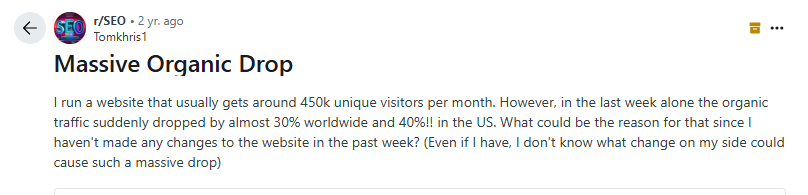
The obvious answer to why they lost organic traffic is the launch of AI Overviews (AIO), which is Google’s way of saying “don’t click on any of the ranking pages. Here’s the answer you’re looking for.”
Case in point:
Traffic to articles with informational intent has dropped sharply due to AIO. It’s triggered 99.2% of the time a user types a “what is” query.
We’ve seen that this extends to commercial queries as well. AI Overview is now triggered for commercial queries 8.69% of the time.
Overall, AI Overviews appear in roughly 47% of search results now, up from 25% in mid-2024.
As expected, it’s affecting businesses:
But AIO isn’t always the only culprit. There are several other reasons your organic traffic may be declining.
What Is the Root Cause of the Decline
When a client contacts us about a traffic drop, we follow a structured diagnostic process before jumping to conclusions. Traffic declines have many possible causes, and misdiagnosing the root issue can waste months of effort. Here’s the approach we recommend:
HigherVisibility’s Diagnostic Checklist
- Check Google Search Console performance first. Open your Performance report and look at the trend line. Is the decline sudden or gradual? A sharp cliff suggests a technical issue or algorithm update, while a slow bleed points to competitive erosion or content decay.
- Compare date ranges. Set a comparison window (same period last year or the previous three months) to determine when the drop started and how severe it is.
- Isolate page-level vs. site-wide impact. Click the “Pages” tab in GSC. If only a few URLs lost traffic, the problem is likely content-specific. If the entire site is affected, you’re looking at a technical or algorithmic issue.
- Correlate timing with known updates. Cross-reference the decline date with Google’s confirmed core updates and tools like the Semrush Sensor. If the drop lines up with an update rollout, that’s your likely cause.
- Check for technical issues. Run a crawl audit (Screaming Frog, our free SEO Grader, or GSC’s Coverage report) to rule out indexing problems, broken redirects, or server errors.
- Rule out external factors. Check Google Trends for your primary keywords. If search demand itself declined, you may be dealing with seasonality or a market shift rather than a site problem.
Nowadays, in our experience in 2026, roughly 80% of traffic drops we investigate trace back to one of two things. Either it’s that the website used to get traffic for informational/top of funnel type queries that are now being overtaken by AI Overviews, or it’s that the pages that used to rank and drive traffic haven’t been updated in years and so they don’t have more recent information that the topic now requires to be comprehensive.
Organic traffic decline can be because of AIO, a Google core update, or a technical error on your website.
The quickest way to know why traffic is down is to look at your performance report on Google Search Console or use third-party tools like SEMrush and Ahrefs.
Take a look at the charts. How does it look? Is the decline steady or irregular?
Here’s a rough sketch from Google to help you guess what went wrong.
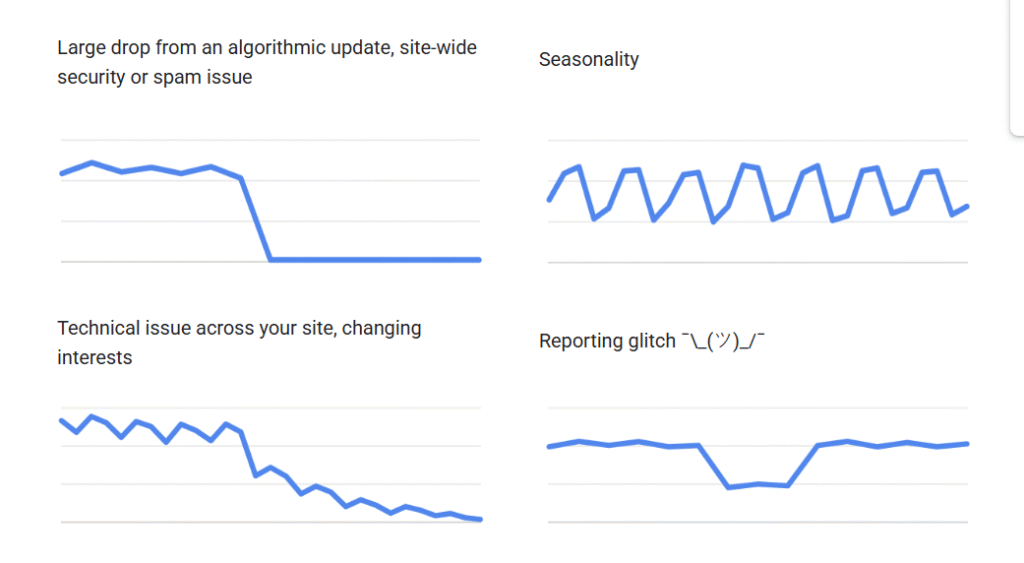
- If it’s the top left chart, it’s probably an algorithmic shift. It can be a page-level technical issue (e.g. unintended noindex tag, which means Google can’t crawl the page(s). Also, Google regularly improves how it evaluates content, so core updates may change how some of your high-traffic pages perform on Google.
- If the traffic decline looks like what’s on the top right chart, it’s seasonal traffic shifts. This is common to ecomm business with seasonal products. It can also be caused by weather changes, holidays, or vacations, as people aren’t visiting your site as regularly.
- If it’s the bottom left chart, it’s a technical issue affecting your whole website. These are issues that prevent Google from crawling, indexing or serving your pages to users. In most cases, it means your website is down or many of your high-value pages are suddenly inaccessible.
- If it’s the bottom right chart, it’s reporting glitches. It means there was a major decline in traffic which then returned to normal patterns (as seen above). It’s a glitch, and you don’t have to worry.
To know which it is, head to your Google Search Console and analyze the patterns to be sure.
Google recommends going as far back as 16 months so you can trace the rise and fall of your traffic:
- Compare the last three months year over year or the last three months YOY.
- Comparing these periods shows you exactly when the drop started and how steep it is.
- Check if the decline is a site-wide issue or a page-level issue.
- Click the “Pages” section on your performance report, and select the same date difference (the same month last year or the same day last week) to compare the traffic trend.
Use these patterns to identify the cause and act on what you find.
Eight Reasons Why Your Organic Search Traffic Decreased
This isn’t an exhaustive list, but it’s worth paying attention to. That’s why we recommend speaking with an SEO professional to audit your webpages to give a proper diagnosis of what happened to your website.
1. AI Overviews (AIO), AI Mode, and Zero-Click Searches
Zero-click search /content is the concept that users want value from the page they’re in without clicking any link to another page.
If they don’t get what they want, they scroll, check another platform, or try another search query. If they’re on social media, they’ll scroll. But on Google, they may eventually click on a page or use chat bots.
Since Google introduced AI Overviews, some companies have lost 20-40% of their organic traffic. Some had up to 56% drop in CTR (like news websites, MailOnline).
This means that even if you do everything right, AIO will reduce clicks to your website, which will then reduce your overall organic traffic.
Here’s something that catches many site owners off guard: your traffic can drop even when your rankings haven’t changed at all. This happens because AI Overviews absorb clicks at the SERP level, not at the ranking level. If Google places an AIO box above your #1 position result, searchers get their answer without scrolling down to your listing. You’re still ranking, but fewer people are clicking through. This is exactly the kind of scenario that shows up in PAA questions like “Why is my organic traffic dropping even though my search rankings haven’t changed?” The answer is that the SERP itself has changed around you.
What Can You Do to Optimize for AIO and Other Zero-Click Features on Google
Optimize your content with long tail Q&A sections. You can make these specific H2s, H3s or dedicated FAQs where you can answer common queries.
We currently optimize our clients’ content for long tail keywords. These are question and answer type of query, so that AIO can summarize our content in its response:
We also try to answer the question first, then explain.
So if our heading is “What is the root cause of the decline?” The next sentence is the answer: “Organic traffic decline can be because of AIO, a Google core update, or a technical error on your website.” You can see this in our previous section.
While this doesn’t lead to clicks to the website, it increases visibility, especially if the searcher expands the source list.
If the searcher wants to learn more about what they’ve read, there’s a direct link to our client’s website.
To find some of these long tail keywords, use the People Also Asked box,
Or use third-party tools like SEMrush and Ahrefs to analyze your primary keywords.
📌Read more: how to optimize/rank for AIO .
2. The Rise of AI Search Engines
Chat bots like Chat GPT, Claude AI, and Perplexity AI now answer questions without directing users to click on any website.
In fact, Open AI now allows users to shop on Chat GPT . Users can type a query like “best noise cancelling headphones under $200” and receive product suggestions with prices, reviews, and direct purchase links:
This means that some of the 180 million active users of Chat GPT may decide to shop, ask questions they would normally google, and get immediate answers without relying on Google or the websites that created the content they’re consuming.
In total, there are over 987 million people using chat bots globally. This will reduce traffic to your website, even if your pages are well-optimized to rank on Google.
What to Do to Increase Mentions in LLMs
We advise our clients to optimize their websites for mentions in LLMs.
This means we prioritize content that can increase their brand visibility and mentions in LLMs.
This way, when a user searches for best headphones under $200 or best coffee maker within $X range, our client will be mentioned.
And when they’re mentioned, the user will get a direct link to learn more about any of the products that spike their interest.
This is why although Google is losing traffic, well-optimized content that shows how you can help your reader will still help you convert those readers.
So which type of content should you create to be noticed by chat bots (and even AI Overview)?
- Target category keywords: These are keywords relating to your business category that people are looking for. For example, “best coffee makers,” cotton joggers for men,” or “project management software.” If you want to take it a step further, be more specific and optimize for “best coffee maker under $300.”
- Target comparison, alternatives or “best xyz” content: This is where you compare your product (or brand) to a competitor’s. This is common in B2B SaaS content marketing, where you’ll see articles such as “Shopify vs Wix for small business owners,” “ClickUp vs. Monday.com for project management” or “best e-commerce platforms for small businesses.”
But it’s not just SaaS brands doing this. An e-commerce brand like Jibby has a comparison table on its website.
This kind of content helps you compare your product with your competitor’s product and write a near-objective verdict on how (and why) your product is better.
This helps you build PR on your website, and it can increase how AI chat bots mention and phrase the features of your products.
Case in point: the Anker Soundcore Space Q45 Wireless recommendation from Chat GPT earlier was directly pulled from a blog post published by Soundcore (the maker of the headphone).
Guess the title of the blog post? “Best noise cancelling headphone under $200.”
- Target buyer-intent content: this can also be called jobs-to-be-done content, i.e. content that addresses the pain points of your target audience. For example, “quick brewing machine for office,” or “easy coffee maker for busy mornings.” When you create this content, you’ll rank for it on Google. And when users ask these queries on chat bots, you also have a high chance of ranking for them because you’ve optimized your website specifically for those queries/keywords.
When you do these, be intentional about how you phrase your product, services, and features in your content.
This is because chat bots are language models, and they understand word association. So regularly associate your company with your product, the use cases, features, and the pain points it addresses for your target audience.
This way, even if AI chat bots are the driver of your decline in traffic, they can point back to you when users search for queries with commercial intent or are ready to buy.
If AI chat bots and AIO isn’t responsible for the traffic decline, here are other things to consider:
3. Search Engine Core Updates
Search engines like Google and Microsoft regularly update their algorithms to provide users with relevant, informative, and quality information. This leads to regular core updates , which may favor some websites with higher rankings. Others will be slapped with a decline.
For instance, after the March 2025 core update, a user posted their massive decline in rankings.
Instead, websites like Reddit, Home Depot, and Yelp gained more traffic.
The update affected websites with overly AI-generated content that add no value. Google also penalized repetitive AI content and emphasized human-first, original content.
What to Do After an Algorithm Update Affects Your Organic Traffic
Read the details of the update from reputable sources like Search Engine Journal or Google’s web admin’s blog . You can also follow people who post first-hand information, such as John Mueller, Google’s search advocate, or Addy Osmani , senior staff engineering manager for Google Chrome, or Barry Schwartz, news editor at Search Engine Land .
While analyzing the details, check if your website needs to be improved based on the update.
If there was a crackdown on spam links, audit your backlinks and delete shady ones to keep your website fresh.
If there was a crackdown on AI-generated content, audit your content library and rewrite the affected content.
If there was a crackdown on old, outdated content, delete some pages and update important ones to restore their organic traffic value.
How to confirm a core update caused your traffic drop. Not every decline lines up with a core update, so you’ll want to verify the connection before spending weeks on recovery. Start by checking whether your traffic drop coincides with a known update rollout date. Google announces core updates on the Google Search Status Dashboard, and they typically roll out over one to two weeks. Tools like the Semrush Sensor and MozCast track daily SERP volatility, so you can compare spikes in volatility against your own traffic timeline. If the dates align closely, you have a strong signal. If they don’t, look at the other reasons in this article first.
4. Your Site Is Experiencing Technical SEO Errors
This means Google can’t crawl, index, or serve your pages to web users. And if it goes on for days or weeks unnoticed, you’ll notice a decline in traffic that looks like this:
These technical SEO issues may be because of problems like
- Canonicalized tags.
- Broken redirects.
- Unintended Noindex tags.
- Duplicate content across pages.
- Server errors (5xx responses).
What to Do if There Are Site-Wide Technical SEO Issues
Use Screaming Frog, or even our free SEO Grader , to audit your website and discover issues affecting it. With technical SEO, many things may be wrong with your website, but you can prioritize some problems over others just like Aleyda Solis, former head of digital strategy at Woorank, says:
“When conducting an SEO audit , ensure that the pages you want to rank for are crawlable and indexable. In my case, it’s all about priority and impact, i.e., high-priority, medium-priority, high-impact, medium-impact. I remove low-priority, low-impact from my audit; you can always disregard it. But I will always concentrate on things that have high priority, high impact, and medium priority, medium impact.”
For context, you can prioritize page speed because a slow site can lead to high bounce rate. Users won’t wait around for more than three seconds for your website to load (and this may reduce your traffic because high bounce rate tells Google bots the page isn’t helpful).
You can choose to optimize your website for mobile-friendliness over fixing sloppy alt text on non-critical images.
You can also prioritize resolving major navigation or UX issues. These are technical SEO issues that if unresolved, can affect user experience and reduce your website traffic.
To make all these easier for you, you can hire a marketing agency like HigherVisibility for your technical SEO needs. We will audit your webpages, backlinks, and show you a detailed report of what went wrong and how we can help you fix it. Contact our team today for a free SEO audit to identify and resolve the issues holding your site back.
5. Competitor Improvement
Another reason your traffic may be dropping is that your competitors have upped their game.
In some cases, your content might be better (in terms of quality). But they might be doing something differently.
What to Do to Compete With Others in Your Industry
Conduct an in-depth competitor analysis to find opportunities to perform better. Look into their keyword strategy, backlink profile, and traffic sources. Use third-party tools like SEMRush, SpyFU, and Ahrefs to find this data.
In an interview with the SEMRush’s team, Stefan Dobois, CEO of SurveyAnyplace, disclosed that they use the information obtained from their competitor audit to:
- Select topics & keywords for their articles based on a competitor page that gets a lot of organic traffic.
- Reach out to websites that generate a lot of referral traffic for a competitor, and see if they can link to their website as well.
- Make decisions about the translation of content: which content to translate into which language based on competitors’ organic traffic numbers in non-English languages. This is especially important if you have a product (and visibility) in multiple markets.
Ben Kazinik, former director of marketing at Mayple, explains how you can milk the juice in your competitor strategy to get more backlinks:
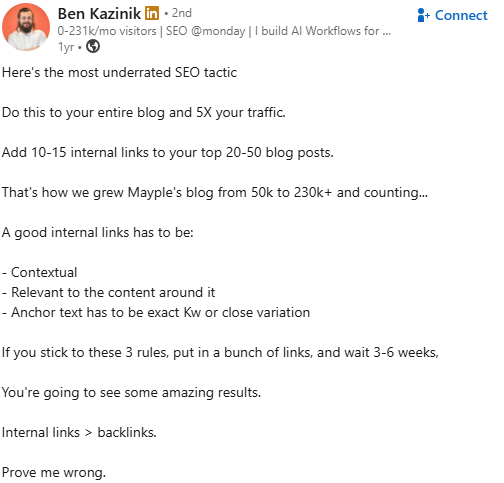
You can follow this strategy as well to improve your backlinks. It’s still relevant in 2026.
6. Website Redesign or Migration
You can experience decline in traffic if you’ve recently redesigned your website or migrated to a new hosting provider. Here’s an example of a charity website. Their traffic tanked after a failed website redesign:
This traffic loss can be a result of many factors. But the most common factors are missing pages, missing or misconfigured redirects, and content changes.
For example, if you’ve recently migrated your site and the high-traffic pages are not properly redirected, users and search engines will not be able to access those pages. This will affect user experience and you’ll lose traffic from those high-value pages.
What to Do After Losing Traffic Because of a Website Redesign or Migration
In case of redirects, manually check all the affected pages in a browser to know if they redirect properly to a new page. Use ScreamingFrog to ensure they’re 301 redirects and not 302 temporary redirects. Also, check the redirected pages to make sure everything works end-to-end.
If you changed your page content during the redesign, monitor its performance over time to make sure it performs better than the previous version. Focus on key performance indicators such as user engagement metrics.
7. Seasonal Trends
You can also lose traffic because of seasonal trends. This may happen because of weather changes, vacations, or holidays, especially if your products are seasonal products.
For example, if you recently concluded a Black Friday sale, it’s not uncommon to experience a dip in traffic after the peak shopping period.
See a graph showing the seasonal search demand for ‘skis.’
You can use Google Trends to identify changes in consumer demand (for a particular product in your niche) and correlate them with traffic levels on your own website. This helps you know if the traffic decline is specific to you or it’s a general industry trend.
What to Do With Seasonal Traffic Declines
The default next step is to wait until you get peak traffic again. But you can do something else:
You can conduct live customer interviews and surveys to understand what users do after the peak-traffic season. Do they need an extra accessory to the product they’ve bought? Can you partner with an affiliate brand so you can provide more value to users?
You can also use tools like Facebook Audience Insights or SparkToro to research consumer behavior, such as keywords used all year round and search channels. These can help you understand search behavior during peak seasons and slow seasons, and then create a strategy to maintain reasonable momentum while prepping for the next peak season.
8. Content Quality and E-E-A-T Issues
Google evaluates your content through the lens of E-E-A-T: Experience, Expertise, Authoritativeness, and Trustworthiness. If your pages don’t demonstrate these qualities, Google will gradually deprioritize them in search results, and your organic traffic will decline as a consequence. This isn’t always a sudden drop. It often looks like a slow, steady erosion that’s easy to miss until it becomes significant.
Signs your content has quality problems:
- Thin pages. Pages with fewer than 300 words or content that barely scratches the surface of a topic. Google has no reason to rank these when competitors cover the same subject in more depth.
- Outdated statistics and references. If your “2023 guide” still cites data from 2019, it signals to both Google and readers that you haven’t maintained your content.
- No expert sourcing. Content that reads like it could have been written by anyone, with no original insights, expert quotes, or firsthand experience, struggles to compete against pages that demonstrate real expertise.
- Duplicate intent across pages. If you have multiple pages targeting the same keyword or answering the same question, they cannibalize each other. Google picks one (and it may not be the one you want).
- Missing author attribution. Pages without clear authorship or author bios lack a basic E-E-A-T signal that Google looks for, especially in YMYL (Your Money or Your Life) topics.
What to do about it:
Start with a content audit. Catalog every page on your site, its traffic trend, and its purpose. Identify pages that are thin, outdated, or competing with each other for the same queries.
From there, you have three options for each underperforming page: update it with fresh data and expert insights, consolidate it with a stronger page on the same topic, or remove it entirely if it adds no value. Pruning low-quality pages can actually improve your site’s overall authority because Google evaluates your content library as a whole, not just individual pages.
Add expertise signals wherever possible. This means including author bios with relevant credentials, citing primary sources, adding original data or case studies, and referencing real client experiences. Review Google’s helpful content guidelines to understand exactly what Google considers “helpful” content versus content created primarily for search engines.
When we conduct content audits for our clients, the most frequent issues we uncover include blog posts with no updates in 18+ months, service pages that describe features without connecting them to outcomes, and articles missing any authorship or EEAT components as to why you should trust this information. Addressing these patterns is often the fastest path to recovering lost organic traffic.
Other Tips to Improve Your Search Traffic in 2026 and Beyond
1. Evaluate Your Current Strategy
The first thing we do while onboarding a new client at HigherVisibility is to analyze their current strategy to identify areas of strengths and weaknesses. This helps us know what worked and hasn’t worked for them so we can improve bottomline revenue as fast as feasible.
Case in point, we onboarded RoadRunners Cigars, a cigar storefront company that needed our e-commerce services . They’ve been trying to increase organic traffic and revenue for years; they had less than 1k monthly organic visitors when they came to us.
To help them, we started with the foundation: their SEO strategy . What can they improve? Are they targeting the right audience ? After thorough analysis, we discovered some issues with their technical SEO, so we had to remedy that first.
Next, we created a user-focused strategy using a proprietary method. This strategy covers content marketing, keyword research, conversion rate optimization so every customer touchpoint can nudge them to take action (buy or add to cart so we can send followup emails).
The results? Their traffic grew to over 4k YoY (250% increase in organic traffic) and 297% increase in organic revenue. Read the full case study here .
We can achieve the same (or better) result for your business. Request a Proposal today to see what we can do for your business.
2. Focus on Your Audience
Create a specific ideal customer profile and create content that targets them. We discussed the type of content to create earlier. Remember to target keywords such as:
- Category keywords.
- Comparison, alternative type of content.
- Buyer-intent or jobs to be done content.
3. Don’t Ignore the Basics
You should always:
- Keep your content concise, informative, logical, and authentic.
- Share your story. Use user-generated content, product reviews, customer testimonials, case studies, etc., to connect with your audience.
- While you build backlinks, don’t underestimate the power of internal linking. Link to other cluster pages (if you’re working on pillar content) and interlink contextually related pages to improve site architecture.
- Use visuals. They’re effective in communicating complex ideas and making your brand more memorable.
Frequently Asked Questions
Why Did My Organic Traffic Drop Suddenly?
A sudden traffic drop usually traces back to one of a few causes: a Google core algorithm update, a technical SEO issue (like an accidental noindex tag or server error), the expansion of AI Overviews absorbing clicks, or a competitor making a significant move. The fastest way to narrow it down is to check your Google Search Console Performance report, compare the timing of the drop against known algorithm updates, and audit your site for technical errors.
Can Traffic Drop Even if My Rankings Haven’t Changed?
Yes, and this is one of the most common questions we hear from clients. AI Overviews and other SERP features (featured snippets, People Also Ask boxes, knowledge panels) can absorb clicks above your organic listing, even if you’re still in position one. Your ranking is the same, but fewer people are scrolling past the SERP features to reach your result.
How Do I Recover From an Organic Traffic Decline?
Start by diagnosing the cause using the checklist in this article. Once you’ve identified whether the issue is algorithmic, technical, competitive, or content-related, you can take targeted action. For algorithm updates, review and improve content quality. For technical issues, fix crawling and indexing problems. For competitive shifts, conduct a competitor analysis and strengthen your content and backlink strategy.
How Long Does It Take to Recover Organic Traffic After a Drop?
Recovery timelines vary based on the cause. Technical fixes (like resolving a noindex issue) can restore traffic within days once Google recrawls. Algorithm-related declines typically take three to six months of sustained content and quality improvements. Competitive losses require ongoing effort and may take six months or longer to reverse, depending on your industry and the gap you need to close.
Should I Hire an SEO Agency to Fix a Traffic Decline?
If you don’t have in-house SEO expertise or if the decline is significant and you can’t pinpoint the cause, working with an experienced agency can save you months of trial and error. An agency like HigherVisibility brings diagnostic tools, industry benchmarks, and a structured recovery process that most internal teams don’t have access to. Request a Proposal today to get a custom strategy from our SEO experts.
Hire an SEO Professional
Organic traffic decline is one of the dominoes of the launch of AI Overviews, and now, AI Mode. There may be seven other reasons you’re losing traffic, and we’ve provided answers on what to do in this article.
If SEO isn’t in your wheelhouse, it’s cost-effective and time-saving to outsource your SEO to an expert. A good marketing agency has the experience and marketing/analytics software to find issues that lead to organic traffic decline. We also know how to take you from where you are to where you want to be.
Is Your Organic Traffic Dropping? We Can Help Fix It.
Experiencing a decline in organic traffic? Our SEO experts can diagnose the issue and implement strategies to recover your traffic. Request a tailored proposal today and get your traffic back on track.
Request a Proposal today and get a custom recovery strategy from our SEO experts.
Need Expert Help?
At HigherVisibility, we specialize in diagnosing and resolving traffic declines. Contact us for a custom audit and expert guidance to enhance your website’s performance.

How does your website measure up in SEO? Find out with our easy-to-use, free grading tool. Get a clear SEO grade for your website in just 60 seconds.
From Our Insite Blog
We believe that SEO requires an all-encompassing approach to ensure a sustainable future for your site and achieve your goal…. conversions.

HigherVisibility rose to the occasion. I knew the SEO process would not produce overnight results but our business is at record levels for the 40+ years we have been in business.