How Often Should You Update SEO?

Key Takeaways
- SEO strategy needs regular revamping to avoid stagnant results and adapt to changing marketing objectives.
- Creating pillar pages with high-volume keywords can drive more traffic for brand awareness compared to focusing solely on high-intent, low-traffic keywords.
- By strategically linking to high-intent and high-value pages, you can showcase your product's value while increasing organic traffic through pillar pages.
Editor’s Note: This post was originally published in December 2023 and updated in July 2026 for accuracy and comprehensiveness.
Your SEO strategy needs to be revamped every three to six months, because if you keep doing the same thing, you’ll keep getting the same results. That doesn’t mean you shouldn’t experiment or give your campaigns time to prove themselves. It means you need to know when to shift gears to pursue newer marketing objectives.
For instance, targeting high-intent keywords is a smart way to attract and convert people looking for your product or services. But high-intent keywords often have low traffic.
If you’ve achieved enough success through signups and other KPIs and want to increase organic traffic (for brand awareness), create pillar pages with high-volume keywords and link to them. These drive more traffic than the typical high-intent, bottom-of-the-funnel, low-volume keywords.
With this approach, you can still link to your high-intent and high-value pages to refer visitors and demonstrate your product’s value.
In this article, I’ll explain why SEO is an ongoing process and the signals to watch for when you optimize your SEO strategy.
Why Is SEO Strategy an Ongoing Process?
There are many reasons, but here are the leading ones why SEO strategy isn’t static:
- SEO algorithms are constantly changing: Google and other search engines update their ranking standards through new releases all the time. Google is keen on improving the user search experience, which means it invests heavily in algorithms that spot helpful content and reader-friendly web pages.
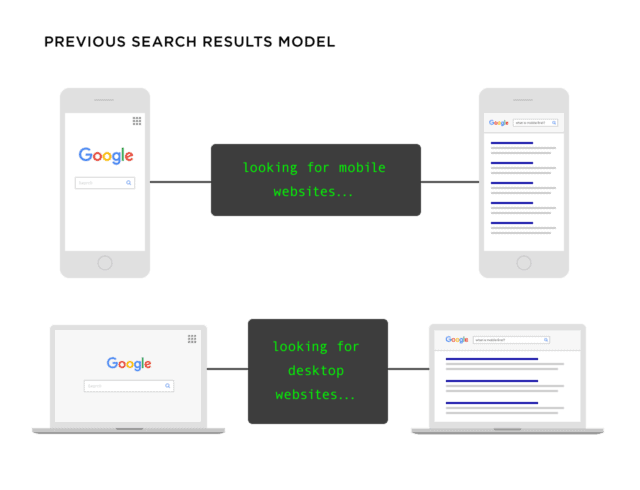
Before 2023, Google ranked websites based on whether they were optimized for desktop or mobile. If your website was optimized for desktop, it might rank for desktop users but not for mobile users. The previous model had this structure:
- Optimized on mobile = rank on mobile devices
- Optimized on desktop = rank for desktop users
Here’s a Backlinko illustration:
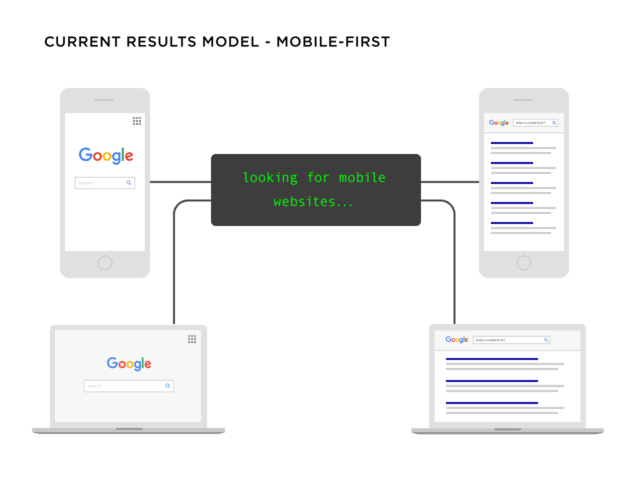
Since October 2023, Google has fully transitioned to mobile-first indexing. This means that if your website isn’t optimized for mobile devices, it won’t rank well for either mobile or desktop searches. Google chose mobile-first indexing because “mobile web traffic has continued to grow…people almost exclusively use their phone to access the internet.”
Google now runs multiple core updates every year, and that pace has continued through 2025 and 2026. If you’re unaware of these updates and how they affect your visibility, your website may slowly slip to the second or later pages of the SERPs, like the 44% of respondents in a survey who reported that their rankings or traffic declined. That’s bad for business. Across 15+ years of client work, we rarely see a strategy stay static for a full quarter before the data tells us to adjust.
- Consumer search preferences are never the same: The growth in voice and image searches presents new opportunities to rank for fresh keywords and attract quality traffic. For instance, you can add alt text to your images to rank for more image searches. If you don’t know this, you may not optimize all your media assets to rank on Google.
Another thing to consider is that the user journey isn’t linear. It’s rare to see a customer convert on the first visit unless you’re a well-established brand that attracts branded searches. You need to understand user search behavior, what they’re looking for in terms of content, and what influences their purchase decisions.
For example, a B2C buyer is more interested in seeing reviews from other customers before purchasing. So let your SEO strategy include user-generated content on high-converting pages.
B2B buyers, on the other hand, are more likely to search for case studies or white papers that demonstrate the value and ROI of a product or service before paying for it. Learn these nuances and factor them into your strategy.
- Optimizing for generative AI tools: Tools like Perplexity AI get huge traffic every day. Google’s use of AI Overviews is also a factor, since users find answers faster without clicking through to web pages. In some cases, Google’s AI Overviews and Perplexity recommend websites for users to read more from.
Ranking online now extends to being cited as a relevant source in generative AI search tools. This means that beyond targeting relevant keywords and optimizing your website, you also need to cater to these AI tools.
Perplexity AI gets over 100 million visits a month, and appearing in the sources these engines cite can drive meaningful referral traffic to your website. Having a strategy to show up in these tools’ results is another reason SEO strategies change.
- The competitor effect: You’re not the only one vying for the top spot on the SERPs. Your competitors want it too. This calls for consistent competitive analysis when you build an SEO strategy for your business.
How Often Should You Update Your SEO Strategy?
You should update your SEO strategy as often as your data tells you to. That sounds vague, so here’s how we think about it at HigherVisibility.
Every brand has different goals that decide how often they update. If your goal is to convert traffic and increase revenue, you’ll create content that targets ready-to-buy customers. You’ll also want to optimize your product pages and improve conversion funnels to lift click-through rates.
If you want to generate traffic and find ways to convert it, target high-volume keywords and filter them with high-intent keywords. This helps you grow organic traffic while reaching people interested in your product or service. If this is your goal, update your strategy at least once every six months to find new keyword opportunities and fresh approaches to content.
Our Targeted Growth System treats SEO as continuous optimization, not a once-a-year project. Across 15+ years of client work, the cadence that keeps rankings healthy tends to look like this:
| Interval | What to do |
|---|---|
| Weekly | Monitor rankings, organic traffic, and Core Web Vitals for sudden changes. |
| Monthly | Refresh decaying or high-value content and clean up on-page issues. |
| Quarterly | Run a full SEO strategy audit and reset your priorities. |
| Annually | Complete a comprehensive technical and content audit. |
This cadence scales with your site. A large ecommerce catalog or a multi-location franchise needs more frequent checks than a 20-page service site, and aggressive growth goals tighten every interval.
How to Find Which Pages to Update
Before you refresh anything, you need to know which pages are actually costing you. Here’s the order we work through when we prioritize a client’s pages.
Start with a content inventory so you can see every indexable page you’re working with. Then layer in these checks:
- Flag outdated information, dated statistics, old screenshots, and references to years or products that no longer apply.
- Check performance metrics in Google Search Console, watching traffic, impressions, and average position trends over the last few months.
- Review rankings for your priority keywords, and note the pages that slipped off page one.
- Watch competitor movement to see who overtook you and what they changed.
We refresh the pages with the most to gain first: the ones that used to rank well and are now decaying, plus high-intent pages sitting just off page one where a small lift drives real revenue. A full SEO audit gives you this picture in one pass, and competitor analysis shows you what the winning pages are doing differently.
If you want a fast starting point, Scan Your Website for Free and get a clear SEO grade in about 60 seconds.
What an SEO Content Update Actually Involves
An SEO content update isn’t a full redesign. It’s a focused set of changes to an existing page that protects and improves its rankings without starting over. When we scope an update for a client, it usually covers four things:
- Rewrite title tags and meta descriptions so they match current search intent.
- Update facts, examples, and sections so the page answers the query better than the results outranking you.
- Add internal links between related pages so authority flows where it matters most.
- Fix the speed, crawl, and indexing issues holding the page back.
Because you’re improving a page that already has history with Google, a well-scoped update protects the rankings and links you’ve earned instead of resetting them.
Signs You Need to Update Your SEO Strategy
Observing your SEO performance is an easy way to know what’s happening in the backend. Here are some of the things you’d identify before you analyze and update your strategy:
1. Your Content Is in the Plateau or Decay Phase
Jimmy Daly of Animalz gave an interesting analogy on content growth. According to his content decay model, every blog post passes through five stages:
- The spike phase
- The trough phase
- The growth phase
- The plateau phase
- The decay phase
The plateau and decay phase is the moment when your content starts to lose relevance in the search results. It no longer caters to user search intent as well as it used to, or your competitor’s article is better because they covered new angles in their posts.
Refreshing your content, or better yet your overall SEO strategy, can help you grow more traffic. In fact, “freshness” is one of Google’s indirect ranking factors, since they prefer that your pages be updated regularly, especially if your target keyword demands it.
A good start is to take inventory of all your web pages. Conduct a site audit to find technical and on-page issues like broken or outdated links, keyword gaps, and slow site speed. Also, if you’ve recently published a blog post, run a quick check after three weeks or one month to gauge its performance. If you notice:
- Traffic has been declining steadily month over month
- The page contributes only a tiny portion of your website traffic
- There are a lot of areas, in terms of keywords, left uncovered
…then it’s a sign your web content needs an overhaul.
Note: A content “refresh” matters most when you’re targeting search queries that require it regularly. For example, if you’re selling electronic gadgets, you’ll need to publish or update content whenever a new model is released. This is subjective, and it only gives you an idea of how often you should update your SEO.
What to do:
The goal isn’t to update your content to “outperform the competition” or “drive better traffic.” Instead, it should focus on your target audience and give them the best and most enjoyable experience on your site. This may mean refreshing your web pages once or twice every month. As I shared earlier, it depends on your data and target keyword.
You can also use heat maps or session recording tools to see how users interact with your content and which sections they spend the most time on. This gives you an idea of which areas are most engaging or need improvement, like where they drop off.
2. A Decline in Organic Traffic
A decline in organic traffic is one of the clearest signals. When you notice anything unusual about your organic traffic (unless you’re targeting seasonal keywords), check your website to learn why.
A traffic drop can be the result of any of the following, or a combination of them:
- An algorithm update
- Server downtime
- Seasonal trends
- Your competitors are winning for your keywords
- A website revamp (it’s normal to experience fluctuations after a revamp)
What to do:
The first step is to verify the reason for your traffic loss. Google Analytics, or better yet a third-party SEO tool like Ahrefs, provides a glimpse into your traffic over time. You can adjust the dates to the last quarter or year to get a comprehensive view of your website traffic.
Look at the pattern, too. Did the traffic decline steadily, or was there a sharp drop? An algorithm update could cause a sharp decline, or it could be that most of your traffic came from seasonal keywords that are no longer in demand.
If the traffic decline is steady, it could be due to technical SEO issues, lost backlinks, or subpar content that doesn’t cater to user search intent.
Once you identify these issues, use a working strategy to address them and re-optimize your site. Read more about how to assess a traffic drop after a core update.
3. When You Lose Your Ranking Spot to Your Competitors
You’re topping the search results for your target keyword, and boom, three competing websites suddenly outrank you. It’s not a mistake. It only shows that users find these competing pages more “relevant” than yours.
Remember, Google can’t understand web content, but it can determine “relevance” by checking user engagement metrics. For example, high dwell time and session duration indicate that users find the page helpful.
So once you notice your website or high-value pages slowly slipping to the bottom of the search results, it’s time to tighten your seatbelt. You need an SEO update.
What to do:
The first thing to do is review your competitor pages. They might have more updated and comprehensive content, or they might target new keywords that capture what searchers are looking for. Conduct competitor analysis to discover what they’re doing and what you’re not.
Also, read their content. What keywords are they ranking for that you could also target? Can you take another approach to improve content quality and value? While evaluating their strategy, look for gaps that can help you improve outcomes.
4. Your Keyword Performance
Are you currently ranking for your target keyword? If so, what position are you in? You need to update your on-page SEO if you’re not anywhere in the top three results or on the first page.
According to recent statistics, the top three Google search results get about 68.7% of all clicks.
This means roughly 31% of clicks are split among the subsequent positions. If your site is on the second page, you might not get enough traffic, especially if SEO is your primary client acquisition channel.
The way out? Always ensure your keywords are relevant to user search intent. Google’s helpful content update prioritizes helpful, original, and people-centered content, and using the right keywords in your content helps you rank for the relevant search queries.
What to do: When researching keywords, look for those that will give you the maximum impact. Understand the search intent behind the keywords and write quality content that engages readers. You can also:
- Use Reddit, Quora, and Google Trends to see what topics matter most to your users.
- Focus on long-tail keywords, since they carry more precise search intent than short-tail, generic keywords.
For example, instead of searching for “iPhone,” consider “pre-owned iPhone 14 Pro Max for sale.” The latter has a lower search volume than the former, but it’s more detailed, and targeting keywords in this category helps you create a content strategy that brings you closer to potential customers. Thanks to their lower search volume, these keywords have a low difficulty score and are easier to rank for.
Pro tip: If you have many pages on your site, check for multiple pages ranking for the same keyword. This is called keyword cannibalization, and it can hurt your search rankings because Google won’t know which post to index. Tools like Google Search Console or Screaming Frog can help you find these pages and re-optimize them.
5. Poor Conversion Rates
Traffic is good. But we both know conversion is better. After all, what’s the benefit of topping the search results if your efforts aren’t impacting bottom-line results?
A drop in conversion rates, or zero conversions from content, is a clear sign that you’re either publishing the “wrong” content or your CTAs aren’t converting readers.
Your website’s user experience also matters. Adding functionality like new CTAs, bigger buttons, and high-quality images can change how users and search engines navigate your site. This means you can see an increase or decrease in conversions and traffic.
What to do:
Whenever you make these changes, monitor whether they improve web performance and conversions compared to the previous design. You can do this through A/B or usability testing tools. Learn how to generate more leads here to improve your conversion rates.
6. Search Engine Algorithm Updates
Search engines like Google and Bing are constantly releasing and refining their algorithms. Google, for example, makes thousands of changes to Search every year. In 2022 alone it launched 4,725 changes, about 13 a day. These changes can affect your web content and cause your site to lose traffic. If you notice fluctuations in your web traffic after a significant update, it’s a clear sign that you need to evaluate your strategy.
What to do:
Don’t beat yourself up if a major update has hit you. Instead, check the requirements on Google’s website, or the search engine you’re using, and update your SEO strategy accordingly.
7. Evolving User Intent
As technology advances, customer behavior online is changing too. The intent behind specific keywords and search queries evolves as this happens.
For example, a user searching for “best wedding dress” years ago might only have been looking for ideas. Now, Google looks at the user intent by checking previous browsing history and location before serving pages in the search results. The user might not be looking to buy a wedding dress right now, so they might be looking for styles and trends.
Tip: Revisit your SEO strategy at least quarterly and conduct regular SEO audits to discover issues you can resolve. SEO audits are essential if you have many content pages that need to stay relevant in search results.
Keep in mind that the frequency of your audits depends on:
- The size of your website: the more web pages you have, the more regular your audits should be to discover anything holding back performance.
- Changes in user behavior on your site: if you add or remove functionality, monitor how it affects user engagement. Use A/B testing to monitor these changes before implementing them permanently.
There are many other factors to consider, but these two are important when you prepare for an audit.
A better option to help with the process is to partner with an agency. We at HigherVisibility spend quality time analyzing issues with your technical SEO. This helps us uncover problems affecting your visibility and build an action plan that addresses them. We offered technical audits as part of our services for Fitness19, and it led to a 383% increase in organic traffic and an 1844% increase in conversions. Read the full case study here. Learn about our services here and partner with us for better results.
8. Missing or Duplicate Title Tags
Title tags have a direct influence on your click-through rate. It’s the first thing searchers see when they run a query, so you need to make sure they’re compelling and “click-worthy.”
Although Google’s John Mueller shared that page titles are less important for rankings than the page’s primary content, it’s still worth optimizing to encourage strong organic click-through rates.
What to do: Conduct an on-page SEO audit using tools like Screaming Frog to evaluate your site and identify pages without title tags or with duplicate titles, especially if you’re constantly adding or updating web content. Then replace them with compelling, accurate, and optimized ones.
Some tips for creating SEO-friendly title tags:
- Place your primary keyword at the beginning of your title.
- Keep it within 60 characters and the 600-pixel limit.
- Communicate “what’s in it for me” by adding the benefits users stand to gain.
- Use freebies to encourage a click, like “How to create a user persona for SEO (with a free downloadable template).”
- Make sure it’s relevant to your page content.
Tip: If you have content with dated tags, always update the title tags to the current date. For example, the title “How often do you find keywords for SEO in 2022” looks stale in 2026.
9. Slow Page Loading Speed
Website speed has been one of Google’s ranking factors since 2018, when it became a mobile ranking factor.
Google also confirmed here that their ranking systems “look at page experience aspects like a mobile friendly content that loads quickly.”
This means websites with slow page speeds are often de-ranked in search results.
What to do: Use Google’s PageSpeed Insights or Search Console to identify pages with slow loading speeds. SEMrush or Ahrefs give more robust insights into your page performance, including the issues affecting your speed and how to resolve them.
Read more: How to optimize your website performance for increased visibility.
How to Measure Whether Your SEO Update Worked
An update only counts if you can prove it moved the needle, and that starts before you touch the page.
Set a baseline first. Record the page’s current keyword rankings, clicks, impressions, and conversions so you have a clear before picture. After you publish the update, track those same numbers over the following four to eight weeks and compare them against the baseline. Rankings and impressions usually move first, then clicks, then conversions.
This baseline, measure, and report loop is how we keep client reporting transparent: every change ties back to a metric a marketing leader can show their CEO. If something lags, learn how to optimize your website performance and adjust. The weekly metrics below are the exact list we watch to confirm an update is working.
Conclusion: How Often Should You Monitor SEO?
I recommend running SEO audits quarterly. For sites with more pages, you’ll want to update them more often, but you don’t need to monitor SEO every single day.
Here are 10 metrics worth tracking weekly to see how your efforts are paying off:
- Keyword rankings
- Organic traffic
- Conversion rate
- Engagement rate
- Time spent on page
- Bounce rate
- Click-through rate
- Domain Rating or Domain Authority
- Referring domains
- Core Web Vitals
You’ll find all of these in your Google Analytics and Search Console accounts. For 15+ years, we’ve helped hundreds of businesses turn that data into rankings and revenue with our Targeted Growth System, and we’d like to do the same for you. Request a Proposal today and we’ll build you a custom strategy grounded in your goals.
Frequently Asked Questions
How Often Should I Update My Website Content for SEO?
Refresh decaying or high-value pages monthly, and run a full SEO strategy audit quarterly. Pages tied to fast-moving information, like product pages or anything referencing the current year, may need updates as soon as the details change. The right cadence depends on your site size and business goals.
What Are the Signs My SEO Strategy Needs Updating?
Watch for declining organic traffic, content stuck in a plateau or decay phase, lost rankings to competitors, poor conversion rates, and traffic drops after a Google core update. Missing or duplicate title tags and slow page speed are also clear signals. Any one of these is reason enough to reassess.
How Long Does It Take to See Results From SEO Changes?
Most SEO changes take three to six months to show meaningful results, though rankings and impressions often move within a few weeks. Set a baseline before you update a page so you can measure the change accurately. Competitive keywords and larger sites usually take longer.
Does SEO Still Matter in 2026?
Yes. Search still drives qualified traffic, and ranking now includes being cited by AI tools like Google’s AI Overviews and Perplexity. Optimizing for both traditional search and AI answer engines is now part of the same job.
What Happens if I Don’t Update My SEO?
Your rankings tend to slide. Content loses relevance, competitors publish fresher pages, and Google core updates can push stale content down the results. Over time that means less organic traffic and fewer leads from one of your best acquisition channels.le Analytics and Console account.r 15 years we have helped hundreds of businesses succeed in SEO. Let us do it for you! Request a free custom strategy today.

- Why Is SEO Strategy an Ongoing Process?
- How Often Should You Update Your SEO Strategy?
- How to Find Which Pages to Update
- What an SEO Content Update Actually Involves
- Signs You Need to Update Your SEO Strategy
- How to Measure Whether Your SEO Update Worked
- Conclusion: How Often Should You Monitor SEO?
- Frequently Asked Questions

How does your website measure up in SEO? Find out with our easy-to-use, free grading tool. Get a clear SEO grade for your website in just 60 seconds.
From Our Insite Blog
We believe that SEO requires an all-encompassing approach to ensure a sustainable future for your site and achieve your goal…. conversions.

The HV team is the smartest, most creative SEO people in the business. Overall, they have been a pleasure to work with, and I would recommend them without reservation.