Meta Tags For SEO: A Simple Guide For Beginners

Key Takeaways
- Meta tags in SEO play a crucial role by showcasing your webpage's value upfront, potentially boosting click-through rates.
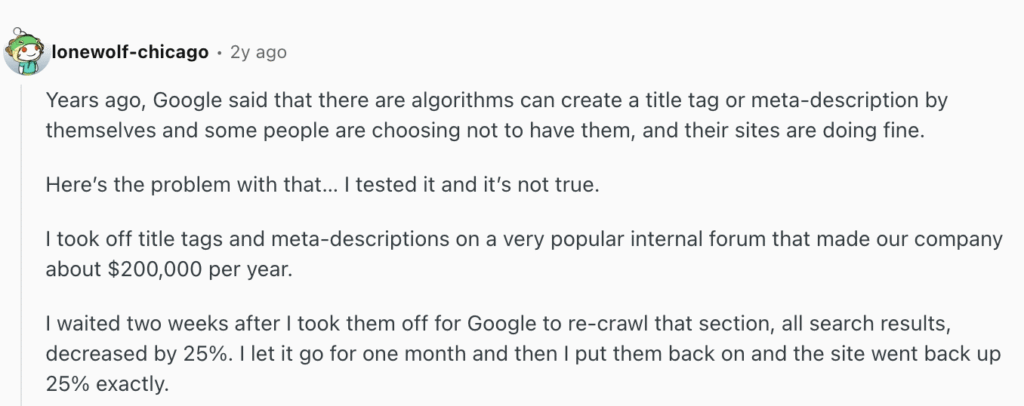
- A Reddit blogger's experiment showed a 25% decrease in web traffic after removing title tags and meta descriptions but witnessed improvement after adding them back.
- Meta tags, including information like title, description, and keywords, help search engines understand and index your content, enhancing visibility in search engine results.
Editor’s Note: This post was originally published in February of 2024 and has been updated for accuracy and comprehensiveness.
Meta tags are one of the overlooked yet important parts of SEO. They show the value of your webpage upfront and can increase click-through rates (CTR).
For instance, this blogger on Reddit ran an experiment on one of their websites that turns over $200,000 per year. They took off the title tags and meta descriptions. After two weeks, their web traffic went down by 25%.
They added the meta descriptions and title tags back, and the traffic improved:
What Are Meta Tags
When our team audits a new client’s site, the first thing we check is the <head> section of the HTML. That section holds all the meta tags, and it tells us immediately whether a site’s SEO foundation is solid or needs work.
Meta tags are HTML codes that provide information about a webpage to search engines and users. They sit within the <head> section of an HTML document and include metadata such as the title, description, and keywords that summarize your page’s content for search engine crawlers.
Here is what a typical <head> section looks like with common meta tags:
<!DOCTYPE html>
<html>
<head>
  <title>Meta Tags For SEO: A Simple Guide For Beginners</title>
  <meta name="description" content="Learn which meta tags matter for SEO, how to implement them, and best practices to boost your search visibility.">
  <meta name="viewport" content="width=device-width, initial-scale=1.0">
  <meta name="robots" content="index, follow">
</head>
<body>
  <!-- Page content goes here -->
</body>
</html>
This helps search engines understand the structure and content of your web page, which makes it easy to match your content with relevant user queries. All of this can help improve your visibility in the search engine results pages (SERPs).
To view the meta tags of any page, press Ctrl+U (you can try it on this page!).

Why Are Meta Tags Important for SEO
Meta tags are important for SEO because they help search engine bots understand and index your webpage for the right search queries.
They provide a quick summary of your website content and help the bots understand what it’s all about, the keyword it’s relevant for, and how to rank it accordingly.
And since meta tags are codes in the headers, these bots can easily compare them to user queries and rank websites accordingly.
Meta tags can also influence click-through rate. Aside from AI Overviews or AI Mode answers, it’s the first thing users see after conducting a search query online. As AI-powered search engines like Google’s AI Overviews pull information from well-structured pages, your meta tags also signal to these systems what your content covers and whether it deserves citation.
We recently optimized meta tags across 50 pages for a client and saw their average organic CTR increase by 3.4% within 60 days.
Meta tags also:
- Encourage users to click on your link.
- Guide search engines on how to index your page.
- Contribute to a positive user experience and impact your site’s overall SEO performance.
Tip: Avoid using duplicate meta descriptions. They confuse search engine bots when they crawl and index your website.
10 Most Important Meta Tags You Need to Know for SEO
Many meta tags are used in SEO (some of which have become irrelevant as Google updates its algorithm). Here, we will focus on the ten most important meta tags you need to know for SEO.
1. Meta Description Tags
A meta description is a summary of your website page’s content. It helps search engines and readers understand what your page is about.
Like a movie trailer highlights interesting scenes to grab attention, a well-crafted meta description gives users a glimpse of “what’s in it for me” for readers.
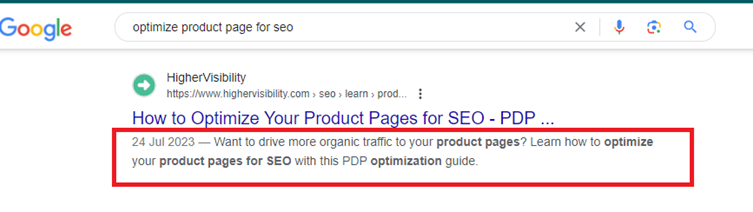
The meta description tag appears in a web page’s <head> section and is commonly (not always) shown in the SERP snippet alongside the title and page URL:
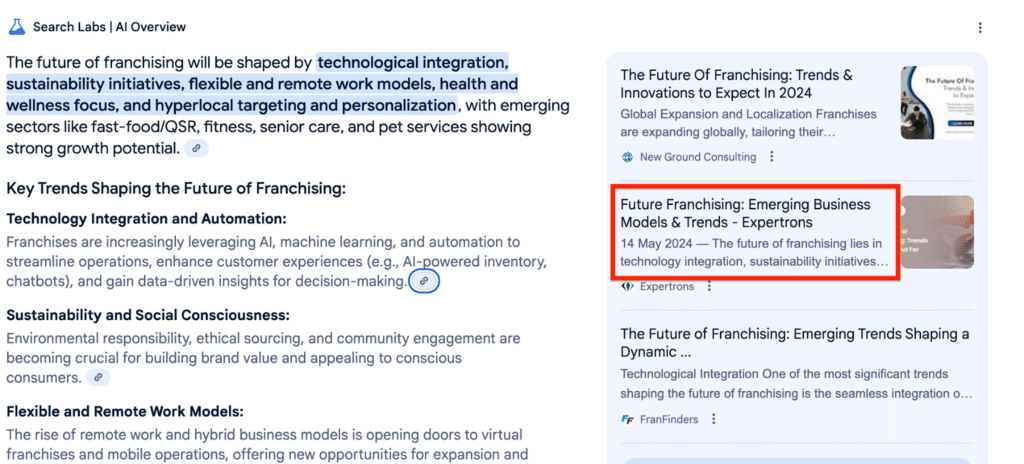
It’s also displayed on the AI Overviews source list:
According to a study, 62.9% of users click on a page because of the meta description. This shows that the right meta description can help you increase CTR. A higher CTR tells Google that your content is valuable and relevant, and the bots are more likely to push it up the search results for more visibility.
Here is what a properly formatted meta description tag looks like in HTML:
<meta name="description" content="Learn which meta tags matter for SEO, how to implement them, and best practices to boost your search visibility.">
Keep in mind that Google doesn’t always use the meta description you write. Google frequently rewrites meta descriptions to better match the searcher’s query. Google has confirmed this, noting that it may pull snippet text from the page’s visible content if it finds a better match. That doesn’t mean you should skip writing them. A strong meta description still influences CTR when Google does use it, and it gives the algorithm a clear signal about your page’s topic.
On our own site, we rewrote a generic meta description from ‘Welcome to our services page’ to ‘Get a free SEO audit and custom growth plan from an award-winning agency. See results in 90 days.’ CTR increased by 8.2%.
Best Practices
- Limit meta descriptions to around 135 characters for brevity.
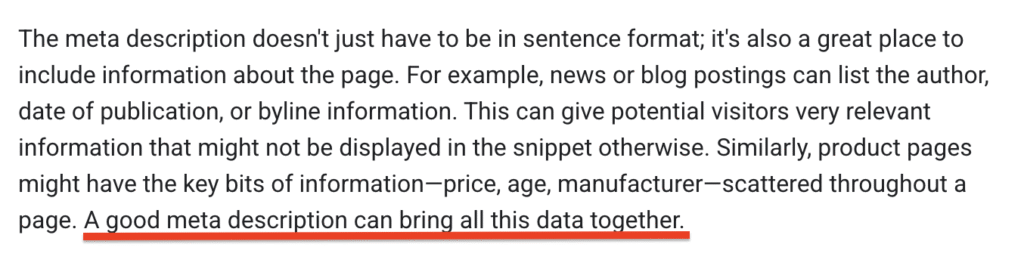
- Ensure it contains valuable information that matches users’ search intent. Google provides more context on this:
- Ensure that the description accurately reflects the content of the page.
- Let relevant keywords appear naturally for SEO.
- Create a unique meta description for each page to avoid duplication.
- Ensure the description is easy to read and understand.
2. Title Tags
Title tags are the clickable headlines you see on the search results pages. It explains what your page is all about and influences how search engine bots and users perceive it. This is how it looks in HTML code:

While traditional exact-match keywords are no longer a must-have to rank on the SERPs (including AIOs), you still need to make sure your titles are concise, eye-grabbing, and match user search queries. Most times, this requires turning your titles into statements that highlight the user’s end goal after reading (search intent).
For example, instead of “How to write better blog posts,” your title can be “How to write SEO blog posts that rank and convert in 2026.”
This title is relevant to the search query, contains the right keyword, and also conveys the value the content offers.
Why is this important?
Searchers are getting more precise with their queries. Instead of using short keywords, they type full questions or specific queries that reflect their intent to get specific results.
Katlyn Edwards, a contributor on Search Engine Land, adds that:
“Google’s AI systems will review your title to decide if your content is able to best answer the user’s query. Just the same as ranking in traditional search results, you’ll want a descriptive, keyword-focused title tag that summarizes your page’s content and reinforces your brand’s topical relevance and authority.”
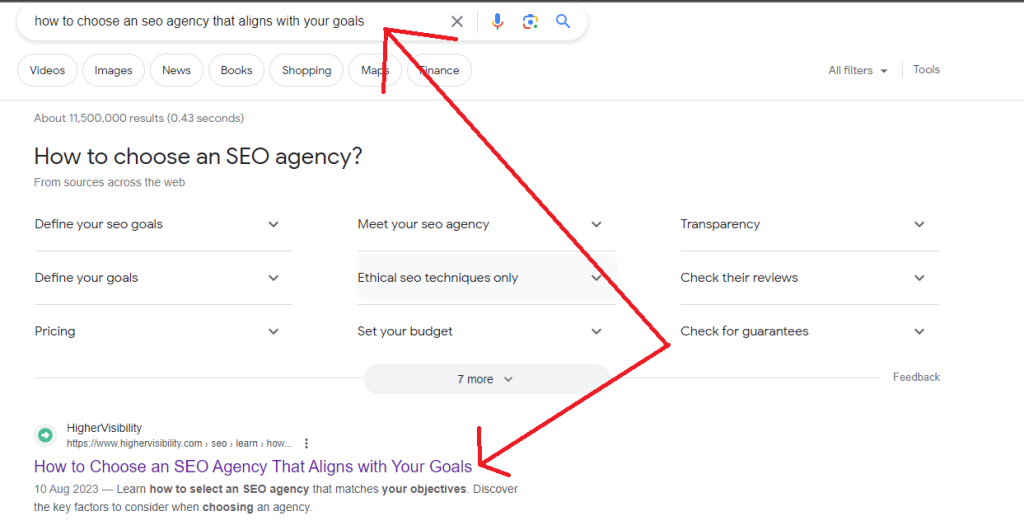
Here is a piece from our Co-Founder and Managing Partner at HigherVisibility, Adam Heitzman. It ranks first place on the search results for the keyword “how to choose an SEO agency that aligns with your goals” because the title tag is optimized correctly:
Best Practices
- Create unique titles for each page.
- Keep titles under 50-60 characters to avoid truncation in SERPs.
- Use A/B testing to test your headlines and see which one performs better in terms of clicks, impressions, and ranking.
- The target keyword should appear first and naturally in the title.
- Avoid clickbait titles (ensure titles accurately describe the page’s content).
- Add modifiers (‘How to,’ ‘Review,’ ‘Best,’ ‘Tips,’ ‘Top’) to your title tag.
- Make the title a descriptive, clear, and concise reflection of the page.
Here’s an extra tip from Katlyn Edwards:
“The best title tags will use a combination of these techniques, promising tangible results for the reader, but also piquing their interest. For example, a title like “15 Best Kitten Toys for Happy, Healthy Furry Friends (Vet-Approved)” combines emotional phrasing (“furry friends”), with functional phrasing (“happy, healthy” and “vet-approved”).”
3. Heading Tags (H1-H6)
Heading tags (H1-H6) help to structure content hierarchically on a webpage. They help users and search engine bots understand how to navigate your webpage, although differently. To search engines, they:
- Help the algorithm understand the organization, hierarchy, and relevance of your content.
- Show the relationship between different sections of your content.
- Help crawlers understand the topics and subtopics on the webpage.
- Allow Google to rank specific sections of your page based on how well they match a user’s search query.
To the readers, heading tags:
- Make it easy for them to scan through your content and identify the section they’re most interested in.
- Provide a visual break in between blocks of text to improve readability.
- Create a logical workflow that guides them through the content step by step (especially if it’s a white paper or long-form blog post, like this one).
- Help them understand what each section is all about without the need to read everything word for word.
See this excellent illustration of a web page with heading tags and one without:
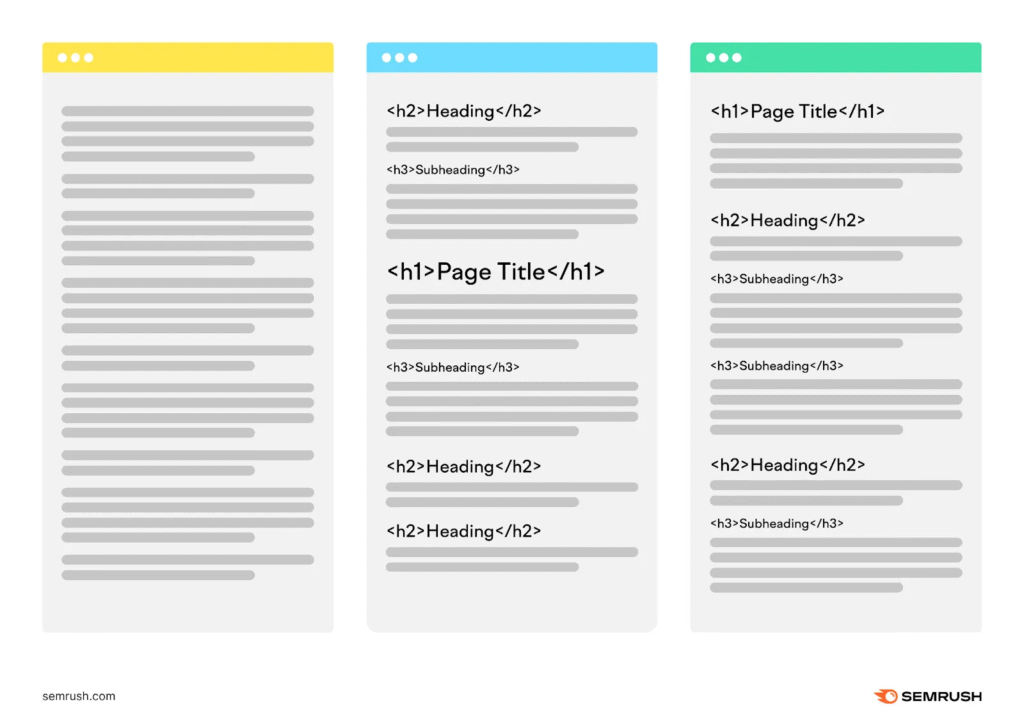
When properly optimized with relevant heading tags and in the right order, they improve user experience and by default, your SEO performance.
Here is what heading tags look like in HTML:
<h1>Meta Tags For SEO: A Simple Guide For Beginners</h1>

<h2>What Are Meta Tags</h2>
<p>Meta tags are HTML codes that provide information...</p>

  <h3>How Meta Tags Help Search Engines</h3>
  <p>Search engines read meta tags to understand...</p>

    <h4>Crawling and Indexing</h4>
    <p>When a bot visits your page...</p>

<h2>Why Are Meta Tags Important for SEO</h2>
<p>Meta tags help search engine bots understand...</p>
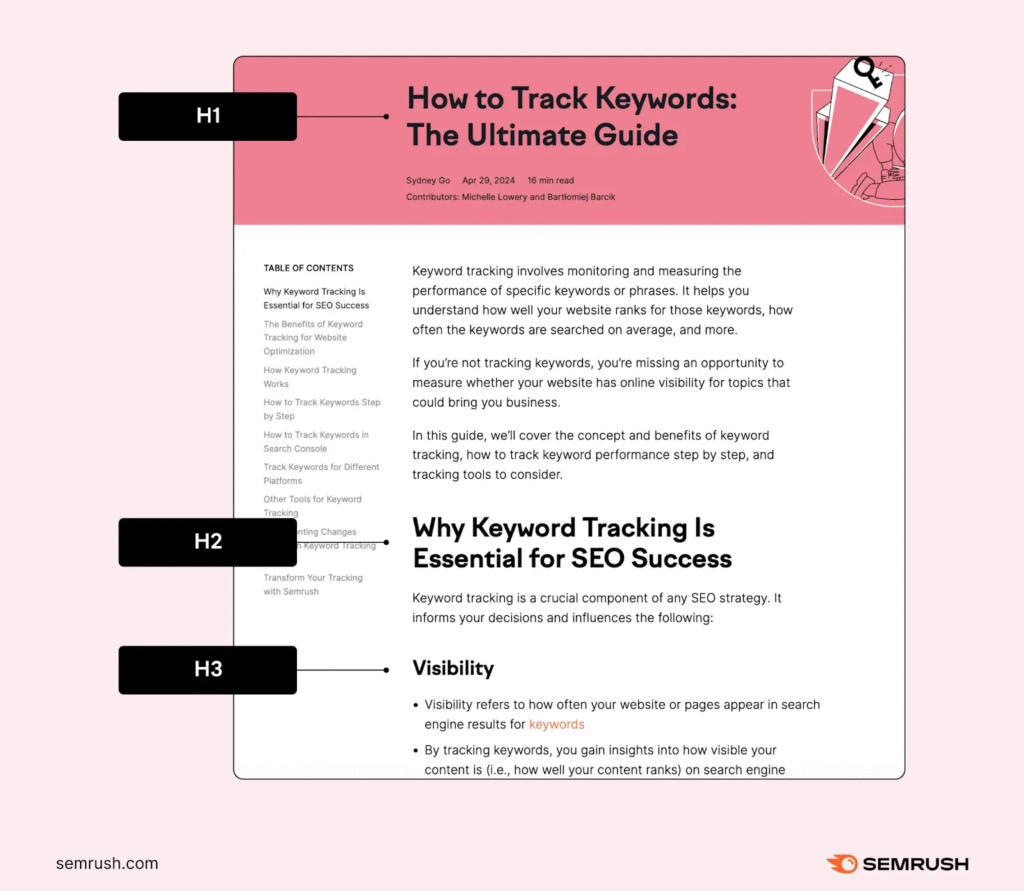
Notice how each heading level nests inside the one above it. H1 is the page title, H2s are major sections, H3s are subsections within an H2, and so on.
We restructured heading tags for a client’s 30 top pages, moving from flat H2-only layouts to proper H1-H4 hierarchies. Within three months, average rankings improved by an average of 7 positions.
Here are some tips on how to use heading tags across your article:
- Use H1 tags for the title of the web page.
- Use H2 and H3 tags for major subheadings.
- Use H4, H5, and H6 tags to provide further structure within H2s.
Just like this:
Best Practices
- Follow HTML structure guidelines for optimal SEO.
- Use only one H1 per page, and it should not exceed 60 characters.
- Google recommends that you match your Title and H1 tag to increase ranking.
- Ensure your headings accurately reflect the sections they describe.
- Avoid excessive use for clarity.
- Distribute relevant keywords naturally among headers.
4. Robots Meta Tags
The meta robots tag instructs search engine crawlers on the amount of content they extract automatically from web pages for display on search results pages. It directs search engines on how to crawl and index web pages.
For example, robot tags offer directives like ‘noindex’ to prevent specific pages from appearing in search results and ‘nofollow’ to prevent crawlers from following certain links. While these tags don’t directly impact how high your page ranks, they control how search engines see your website.
Let’s assume you have pages with irrelevant content (which you need to add for some reason) or private information you don’t want to publicize. By using the ‘noindex’ attribute, search engine crawlers won’t show them on SERPs, keeping them from affecting your website’s SEO.
Here is what a robots meta tag looks like in HTML:
<!DOCTYPE html>
<html>
<head>
  <meta name="robots" content="noindex, nofollow">
</head>
<body>
  <!-- Page content goes here -->
</body>
</html>
Beyond noindex and nofollow, you can also use these directives to control how your content appears in search results:
- max-snippet:[number] sets the maximum character length for your text snippet in search results. Use
max-snippet:-1to allow any length, ormax-snippet:0to show no snippet at all. - max-image-preview:[setting] controls the size of image previews. Options are
none,standard, orlarge. - max-video-preview:[number] sets the maximum number of seconds for a video snippet preview. Use
-1to allow any length.
These directives give you fine-grained control over how Google displays your content in SERPs, featured snippets, and AI Overviews.
Best Practices
- Use the ‘noindex’ attribute for pages with irrelevant, private, or unfinished content.
- Ensure the tags align with content strategy and site goals.
Pro Tip
Sometimes, malicious crawlers ignore Robot meta tags. So, if you have web page information you don’t want to make public, use a more secure approach like password protection.
5. Viewport Meta Tag
With Google’s preference shift to mobile-first indexing, your website’s mobile responsiveness affects your SEO ranking. Yes, directly. This is where viewport meta tags become vital.
The viewport meta tag configures how a page scales and displays across various devices. It changes how the content is displayed and the layout of the webpage, too:
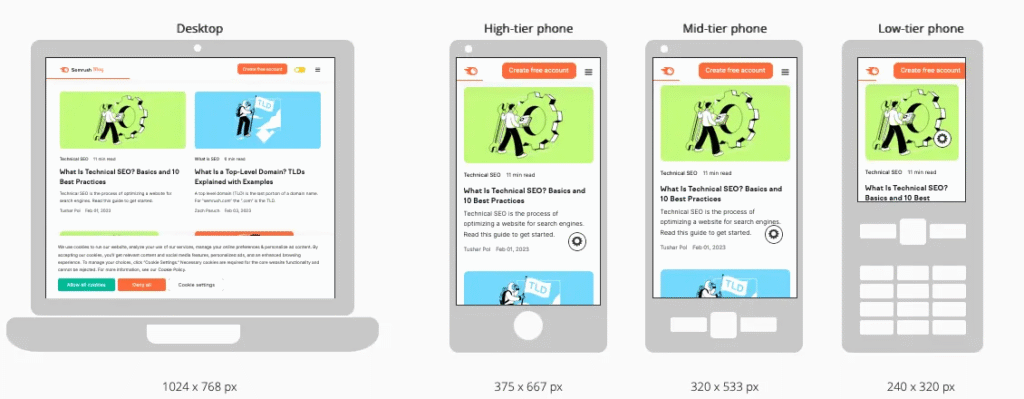
From the image above, you can see how the webpage is rendered across different devices. The desktop on the left shows the full-width layout, with content stretching across a wide screen as intended.
In contrast, the mobile devices on the right adapt to a smaller screen. The texts and images scale down to maintain readability and user friendliness.
Without the viewport meta tag, the browser will display the desktop version zoomed out, and users will have to pinch the page to read the content.
Nobody wants to do that.
This is how a mobile web page would look with and without the viewport tag.
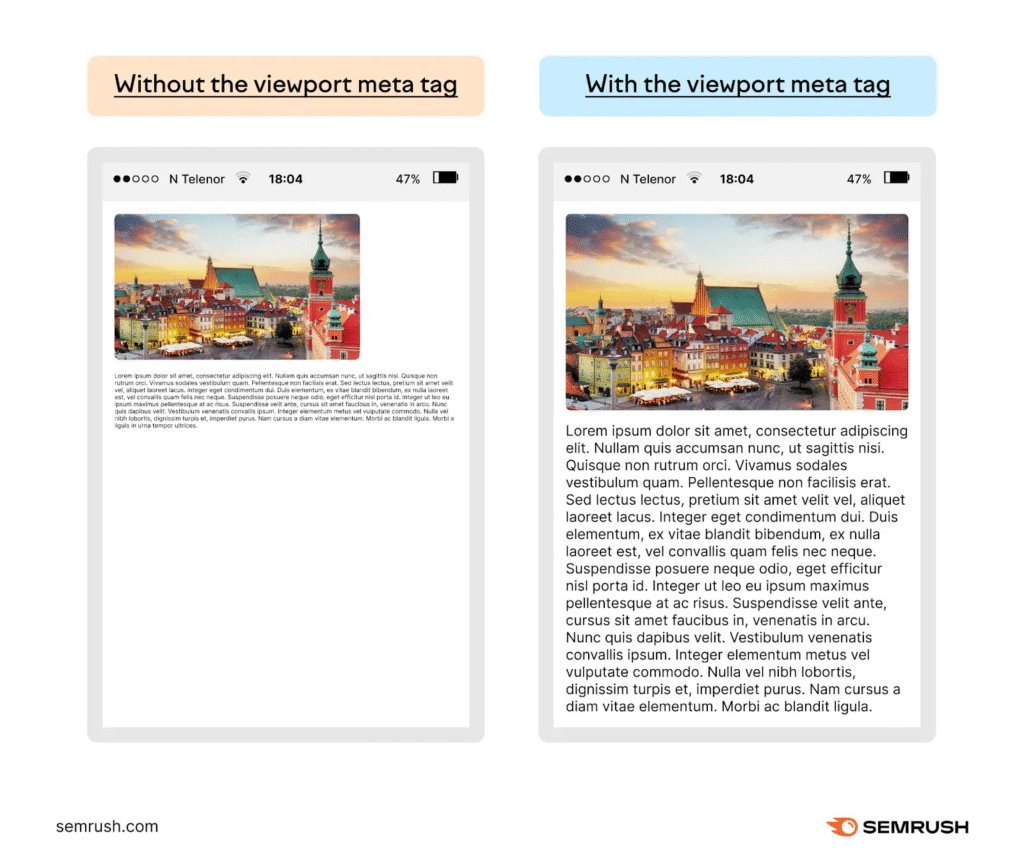
Because of the viewport tag, users are more likely to stay longer on your website. They don’t have to zoom in, scroll sideways, or struggle with poor formatting. All of these culminate in a better user experience and can likely increase time spent on page, which is a positive signal to search engines that your content is valuable and engaging.
Best Practices
- Set an initial scale for optimal viewing.
- Specify a width for responsive design.
- Test on various devices for compatibility.
- Prioritize user experience with smooth and adaptable layouts.
6. Social Media Meta Tags
When sharing your content link across social media platforms, it’s vital to maintain a quality image and correct name, description, and URL. That’s what social media meta tags do. They let you control how your page content looks when shared on social media.
In 2010, Facebook introduced the Open Graph Protocol, a platform that allows you to create rich snippets for web pages. Social media platforms like LinkedIn and Twitter/X (Twitter tag cards) also embraced the trend. Here’s an example:
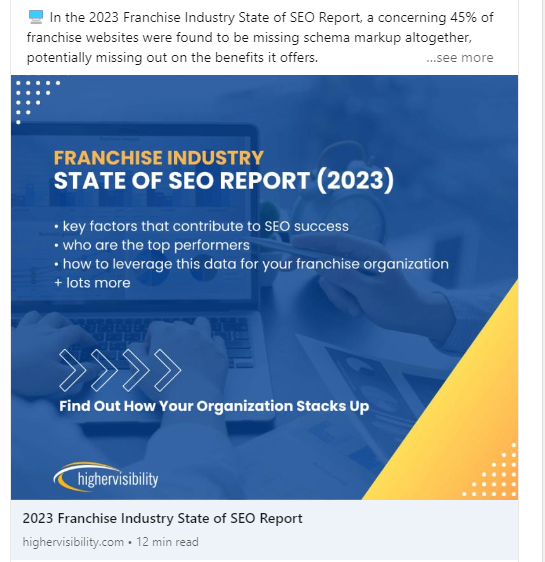
Here are the seven common OpenGraph tags:
- og:title sets the desired title for display when your page is linked.
- og:url specifies your page’s URL.
- og:description creates a concise page description; note that Facebook shows approximately 300 characters.
- og:locale specifies your content’s language and region code (e.g., en_US).
- og:type describes the type of content (e.g., article, video).
- og:site_name adds your website’s name.
- og:image specifies the image URL you want displayed when your page is linked.
Here is what Open Graph tags look like in your HTML <head> section:
<head>
  <meta property="og:title" content="Meta Tags For SEO: A Simple Guide For Beginners">
  <meta property="og:description" content="Learn which meta tags matter for SEO and how to implement them correctly.">
  <meta property="og:image" content="https://www.example.com/images/meta-tags-guide.png">
  <meta property="og:url" content="https://www.example.com/seo/meta-tags/">
  <meta property="og:type" content="article">
  <meta property="og:site_name" content="Your Site Name">
  <meta property="og:locale" content="en_US">
</head>
By optimizing these tags with relevant information, you can control the visual representation of your web page content on social media, increase click-through rates, and improve user experience.
7. Image Alt Attributes
Image alt attributes (also called alt text) are brief descriptions added to images in HTML. Here’s an example:

Ahrefs finds that 92.96% of global traffic comes from Google Search, Google Images, and Google Maps. This means having alt text on your web images can help you rank high in Google Image Search, Visual AI Overviews, and even traditional search results.
Aside from the visibility benefits, alt texts are also important for people who are visually impaired and use adaptive technology (think Braille devices, for example) to access web content. These technologies recognize and read the alt text aloud to help these categories of users understand the context of the images they can’t see.
Read more: How to make your website ADA-compliant.
Best Practices
- Optimize important images (like products or infographics) for Google Images search.
- Keep the alt texts short. The rule of thumb is to keep it under 125 characters.
- Add relevant keywords in your alt text to help search engines understand and rank the images accordingly.
Pro tip:
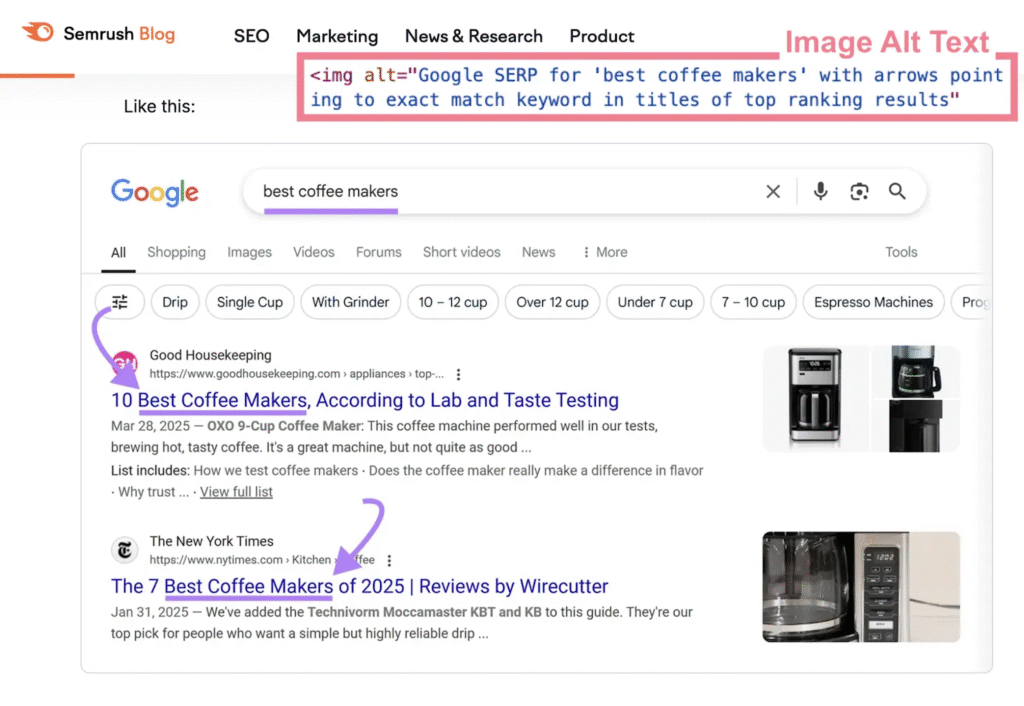
When writing alt text, ensure it describes your images very clearly, and add relevant keywords. This way, even if the pictures don’t load, users will still get the idea, and search engines can accurately index your content. Here’s an example:
8. Nofollow Attributes
Adding external links to your content guides users and provides references to increase the credibility of your content.
While external linking provides value, too much of it can do the opposite. For instance, linking to low-quality or spammy websites can tank your rankings. This is why you should carefully vet the website you link to.
You can always use the rel="nofollow" attribute on links that you’re not entirely sure of. These tags tell search engine bots not to pass link equity to the receiving website, so if the page you linked to is down, it doesn’t affect your website.
Here are some links you should use the “nofollow” attributes for:
- Links to untrusted content.
- Paid or sponsored links.
- Links from comments or user-generated content that are prone to spam.
- Internal ‘Sign in’ links.
- Internal ‘Register’ links.
9. Schema Markup
Schema markup, known as structured data, is a code added to your webpage to help search engines understand its context and content.
By adding this code, you can “markup” specific details such as reviews, ratings, events, and product information on SERPs. This is displayed as “rich results,” a SERP (search engine result pages) feature that contains additional information about your web page, such as star ratings, reviews, FAQ, etc., depending on the schema implemented on the page.
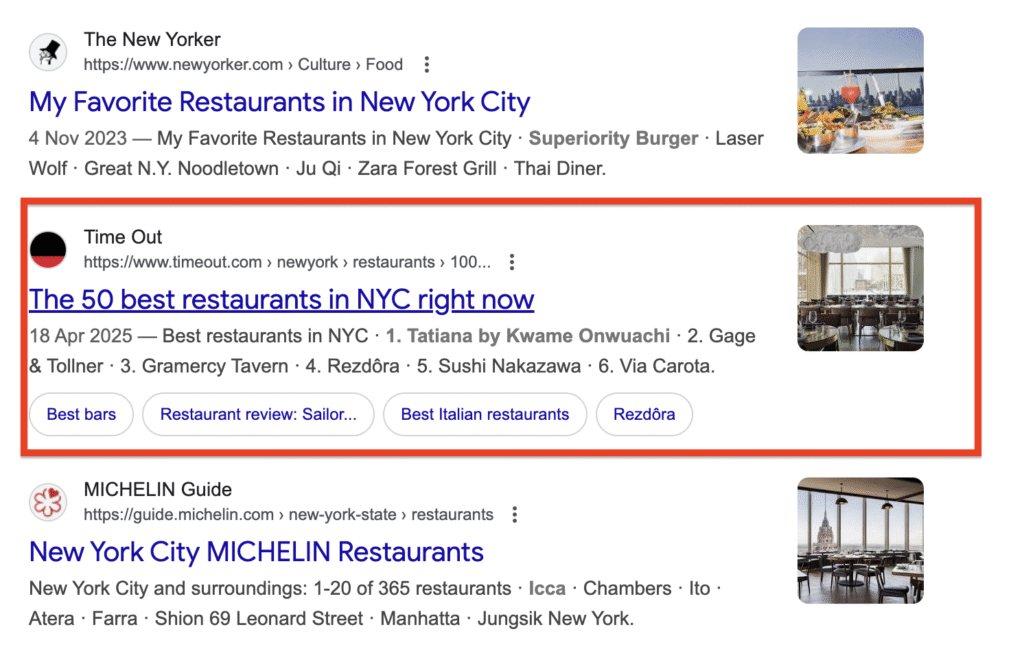
The best thing about schema markup is that it optimizes your website for conversational search queries.
Case in point: by adding the LocalBusiness schema on your Google business profile, you help search engines understand business details such as your name, address, phone number, and service area. This structured data increases your chances of appearing in local search results, map packs, and voice search queries like “what time does the nearest tailor open now?”
The same applies to other SERP features like AI Overviews, Featured Snippets, and People Also Ask boxes. These features are mostly triggered by conversational queries, and using the right markup in your content can help Google push your content to these high-visibility areas.
10. rel=”canonical” Link Tag
The rel=”canonical” link tag helps specify which content is the main one and should be indexed when the same or similar content is available under different URLs.
Let’s assume you run an online store with similar product pages, but you want one page to carry the SEO weight. Adding a rel=”canonical” tag to that page tells search engines to focus there. This prevents duplicate content issues in search engine indexing.
Here is what a canonical tag looks like in HTML:
<link rel="canonical" href="https://www.example.com/preferred-page/">
Place this tag in the <head> section of the duplicate or alternate page, and point the href to the URL you want search engines to treat as the original.
An ecommerce client of ours, had 15 product color variations creating duplicate URLs. We implemented canonical tags pointing to the primary product page, and the consolidated page climbed from position 18 to position 6 within two months.
Best Practices
- Align rel=”canonical” Link Tag with hreflang tags for international SEO.
- Don’t indicate different URLs as canonical for the same page.
- Self-reference canonical tags on every page. Even if a page has no duplicates, adding a self-referencing canonical tag confirms to search engines which URL is preferred.
- Use absolute URLs (include the full
https://www.example.com/page/), not relative paths. - Ensure the canonical URL returns a 200 status code. Pointing a canonical tag to a redirected or broken URL creates confusion for crawlers.
Are Meta Keywords Important for SEO
No, and here’s why:
Meta keywords were once a standard part of SEO. In the early days of search, webmasters added a <meta name="keywords"> tag containing a list of terms related to a page’s content. Search engines relied on these tags to understand what a page covered.
That changed in 2009 when Google officially announced it no longer used the meta keywords tag as a ranking signal. The reason was simple: too many sites stuffed the tag with irrelevant keywords to manipulate rankings. Bing followed suit, and today no major search engine gives the meta keywords tag any ranking weight.
Now, search engines have evolved to analyze actual page content, user behavior, backlinks, and hundreds of other signals to determine relevance. The meta keywords tag is a relic of an earlier era.
That said, other meta tags (like title tags, meta descriptions, and robots tags) remain highly relevant. Don’t confuse “meta keywords are dead” with “meta tags are dead.” They aren’t. The rest of the meta tags covered in this guide still directly influence your visibility, CTR, and indexing.
Common Meta Tag Mistakes to Avoid
Here are five common meta tag mistakes that can negatively impact your web page’s SEO:
1. Duplicate Meta Tags
Using the same meta description or title tag across multiple pages confuses search engines and dilutes your click-through potential. Each page competes with itself instead of standing out with a unique value proposition.
We recently audited a site with 200+ pages sharing the same meta description. Their organic CTR was 0.83%. After we wrote unique descriptions for their top 50 pages, CTR improved by 6.4% within 60 days.
2. Missing or Incomplete Meta Tags
Failing to include a title tag or meta description means search engines have to guess what your page is about. Google will auto-generate a snippet from your page content, but that auto-generated text rarely converts as well as a carefully written description.
3. Incorrectly Formatted Meta Tags
Using incorrect syntax or placing tags outside the <head> section can prevent search engines from reading them. A common error is nesting meta tags inside the <body> instead of the <head>, which renders them invisible to crawlers.
4. Over-Optimization
Stuffing meta tags with too many keywords or using overly promotional language triggers spam signals. Google’s algorithms are sophisticated enough to detect keyword stuffing in meta descriptions and title tags, and the penalty is lower rankings or suppressed snippets.
5. Ignoring Meta Tags for New Pages
This is one of the most common oversights. Teams publish new blog posts, product pages, or landing pages without setting custom title tags and meta descriptions. The page goes live with a CMS-generated default (often just the page slug or a truncated first sentence), which rarely matches search intent or compels clicks.
Build meta tag creation into your publishing workflow. Before any page goes live, confirm that it has a unique title tag, a custom meta description, and the correct robots directive.
How to Add Meta Tags to Your Website
Adding meta tags to your website can be done in several ways, depending on your platform and content management system (CMS). Here are the most common methods:
Manual Coding
If you’re comfortable with HTML, you can add meta tags directly to your page’s <head> section. This method offers the most control. Here is a complete example with all essential meta tags:
<!DOCTYPE html>
<html lang="en">
<head>
  <meta charset="UTF-8">
  <meta name="viewport" content="width=device-width, initial-scale=1.0">
  <title>Your Page Title | Your Brand Name</title>
  <meta name="description" content="A concise, compelling summary of your page content in under 135 characters.">
  <meta name="robots" content="index, follow">
  <link rel="canonical" href="https://www.yoursite.com/this-page/">

  <!-- Open Graph Tags for Social Sharing -->
  <meta property="og:title" content="Your Page Title">
  <meta property="og:description" content="A concise summary of your page for social media.">
  <meta property="og:image" content="https://www.yoursite.com/images/page-image.png">
  <meta property="og:url" content="https://www.yoursite.com/this-page/">
  <meta property="og:type" content="article">
</head>
<body>
  <!-- Page content -->
</body>
</html>
CMS Plugins
Many CMS platforms, such as WordPress, offer plugins that handle meta tags through a visual interface. Plugins like Yoast SEO or All in One SEO Pack let you set title tags, meta descriptions, robots directives, and OG tags per page without editing code.
SEO Tools
Some SEO tools, such as Ahrefs or Semrush, offer features that audit your existing meta tags and recommend improvements. These tools are especially useful for identifying missing or duplicate meta tags across large sites.
When we onboard a new client, our team audits every page’s meta tags using Screaming Frog, flags missing or duplicate tags, then prioritizes rewrites based on traffic potential. We typically start with the top 20 pages by impression volume.
Choose the method that best suits your needs and technical expertise to ensure your meta tags are correctly implemented.
How to Measure the Effectiveness of Your Meta Tags
Here are some common methods to evaluate their performance:
- Monitor your web page’s ranking in search engine results pages (SERPs) to determine the effectiveness of your meta tags. Ideally, higher rankings often indicate well-optimized meta tags.
- The CTR of your web page can provide insights into how compelling your title tag and meta description are. Higher CTRs suggest that users find your meta tags engaging and relevant.
- Tools like Google Analytics can offer detailed insights into how users interact with your web page. Track performance metrics such as bounce rate, average session duration, and user behavior to gauge the effectiveness of your meta tags.
- Conduct regular SEO audits to identify areas for improvement and determine the effectiveness of your meta tags. Tools like Screaming Frog or Sitebulb can automate this process and provide actionable recommendations.
Frequently Asked Questions
What Is a Meta Tag in SEO
A meta tag is an HTML element placed in your page’s <head> section that provides information about the page to search engines and browsers. Meta tags don’t appear on the page itself. Instead, they work behind the scenes to tell search engines what your content covers, how to index it, and how to display it in results. For a full breakdown, see the What Are Meta Tags section above.
Which Meta Tags Are Most Important for SEO
The five most impactful meta tags for SEO are:
- Title tag sets your clickable headline in search results and is a confirmed ranking factor.
- Meta description influences click-through rate by giving searchers a preview of your content.
- Robots meta tag controls whether search engines can index and follow links on your page.
- Viewport meta tag ensures your page renders correctly on mobile devices, which Google uses for mobile-first indexing.
- Canonical tag prevents duplicate content issues by telling search engines which URL is the preferred version.
Are Meta Tags Still Relevant for SEO
Yes. While the meta keywords tag is obsolete, other meta tags remain foundational to SEO. Title tags are a confirmed ranking factor. Meta descriptions influence CTR. Robots tags control indexing. And as AI-powered search features like Google’s AI Overviews grow, well-structured meta tags help these systems understand and cite your content. Ignoring meta tags means leaving visibility, clicks, and AI citations on the table.
What Are Examples of Meta Tags
Here are four common meta tag types with their HTML code:
<!-- Title Tag -->
<title>Best Running Shoes for Beginners | YourSite</title>

<!-- Meta Description -->
<meta name="description" content="Find the best running shoes for beginners with our expert-tested picks and buying guide.">

<!-- Robots Tag -->
<meta name="robots" content="index, follow">

<!-- Viewport Tag -->
<meta name="viewport" content="width=device-width, initial-scale=1.0">
You can also use Open Graph tags for social sharing, canonical tags to manage duplicate content, and schema markup (structured data) to qualify for rich results in search.
Start Optimizing Your Meta Tags Today
Meta tags won’t rank your page on their own, but they set the foundation that makes ranking possible. The three highest-impact actions you can take right now are: write unique, intent-matched title tags and meta descriptions for your top pages; audit your site for missing or duplicate meta tags; and add canonical tags to prevent duplicate content issues.
If you want a team that handles this at scale, backed by data and over 15 years of experience, HigherVisibility can help. Request a proposal to get a custom SEO strategy built around your business goals.

- What Are Meta Tags
- Why Are Meta Tags Important for SEO
- 10 Most Important Meta Tags You Need to Know for SEO
- Are Meta Keywords Important for SEO
- Common Meta Tag Mistakes to Avoid
- How to Add Meta Tags to Your Website
- How to Measure the Effectiveness of Your Meta Tags
- Frequently Asked Questions
- Start Optimizing Your Meta Tags Today
How does your website measure up in SEO? Find out with our easy-to-use, free grading tool. Get a clear SEO grade for your website in just 60 seconds.
From Our Insite Blog
We believe that SEO requires an all-encompassing approach to ensure a sustainable future for your site and achieve your goal…. conversions.

I have been a client for several years now. I am very happy with the work and service that HigherVisibility has provided. They keep me updated on progress and produce results.