Crawl Budget Wins for Large E-Commerce Sites

Key Takeaways
- Google sets limits on what to crawl based on server health, page modification recency, and site link structure, prioritizing efficient crawling.
- Analyzing a large online marketplace, Botify found that Google ignored 99% of pages, emphasizing the need to optimize crawl budget by enhancing linking structures and removing unnecessary URLs.
- Large e-commerce sites with numerous parameter-based URLs, expired listings, and non-indexable pages risk wasting crawl budget, hindering the visibility of valuable content and products.
Google doesn’t crawl every page on your website. It sets limits on what to crawl based on the server health, how recently a page was modified, and the link structure of your site.
Why is Crawl Budget Important to SEO?
Botify, a platform that tracks website’s online visibility in LLMs, analyzed an online vehicle marketplace with over 10 million pages.
They found that Google ignored 99% of the pages. Only 1% were crawled, and just 2% of those were part of the site’s main structure. Internal linking was weak, with many pages having only one internal link.
Their analysis showed that parameter-based URLs, expired listings, and non-indexable pages wasted the company’s crawl budget, and valuable content/pages stayed buried.
To improve crawl efficiency, the company improved its linking structure, blocked unnecessary URLs, and cleaned up its sitemap. In weeks, their organic visibility increased (because Google was able to crawl more pages).
This issue is typical of large e-commerce sites with thousands of pages.
Every color filter, size variation (for items like shoes and clothes), and internal search adds more URLs to your existing product URLs. Pages like:
- /shoes?color=blue&size=9&sort=price_asc,
- /search?q=sneakers, and
- /product/12345-red-large, multiply quickly, even if the product is no longer in stock. These links also have very few SEO values attached to them.
If Google spends crawl time on them, your new product pages and high-priority categories may not get crawled on time. That delay means less visibility in search (for relevant pages) and less traffic during key campaigns.
In this article, you’ll learn how to:
- Find out what Google is crawling.
- Stop Googlebot from wasting time on the wrong pages.
- Make sure your key pages get seen faster.
- Get real results from better crawl budget use.
10 Tips to Optimize Your Crawl Budget
To win on crawl budget, focus on what slows Google down and fix what blocks your key pages from getting seen. The first step is to audit and monitor what Google crawls:
1. Audit and monitor Googlebot’s crawl behavior
You cannot fix crawl budget issues if you don’t know where the bot is spending its time on your website. To start, head to Google Search Console.
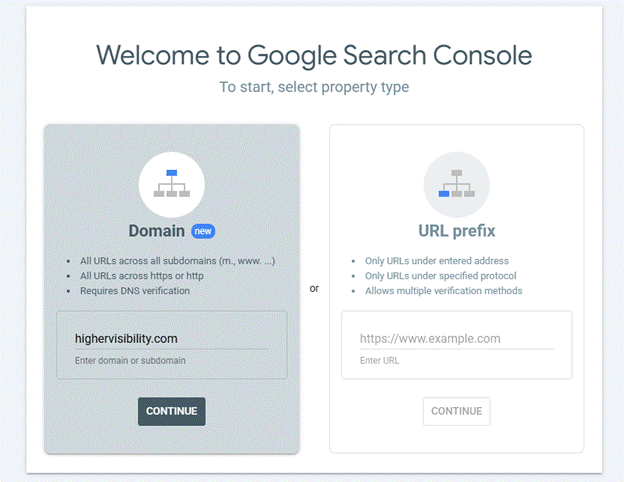
Open the Crawl Stats report. It should look similar to this:
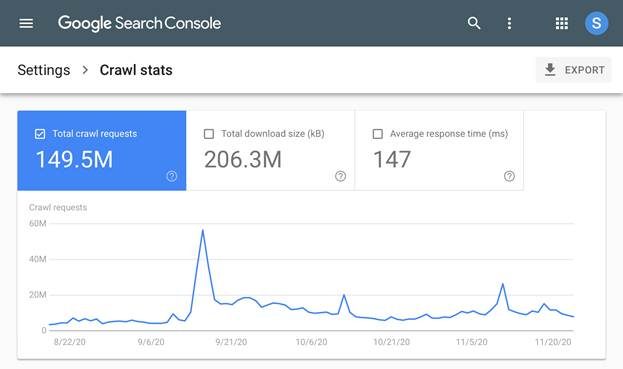
This report shows how many pages Google crawls each day, how fast your server responds, and what status codes Google is seeing.
Look for spikes or sudden drops in crawl volume. Watch for large amounts of 404 or 500 errors.
For deeper insight, check your server logs. This is how you find every URL Googlebot visits.
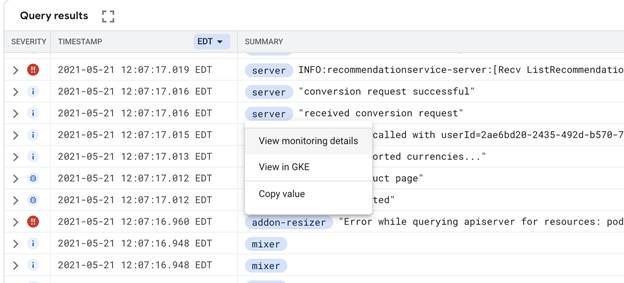
Once you open it, it shows you:
- How often it crawls your product pages.
- If it keeps hitting out-of-stock items.
- Whether it spends time on filter parameters or tracking URLs.
- How much time it wastes on scripts or non-HTML assets.
For example, if Googlebot keeps visiting URLs like /tops?sort=popular&color=green, those visits are probably not helping you rank because they’re not the product pages you optimized for the search results.
If it crawls the same product page ten times a week, but skips your category hub pages, that is a red flag.
💡Tip: You do not need to analyze logs every day. A monthly or quarterly check is enough for most sites, as long as you have at least two weeks of data to spot trends.
In turn, you should keep a list of the patterns you notice. Patterns like
- Repeated hits on certain URL types,
- High crawl rates on broken pages, and more importantly,
- Low crawl activity on important content should incentivize you to take action immediately.
Here’s what you can do:
2. Block “useless” URLs via robots.txt
To save crawl budget, stop Google from crawling pages that do not attract traffic or help clicks convert. You can start from “useless” URLs, pages that do not need to appear in search and only waste crawl budgets.
These include filter variations, cart and checkout pages, internal search results, AJAX endpoints, and tracking URLs.
In an interview, Javier Castaneda, a technical SEO analyst, says that ”every crawl request spent on low-value, parameterized, or duplicated content is a lost opportunity to have high-value, traffic-driving pages crawled and indexed.”
He demonstrated this by blocking backend paths and feed URLs using robots.txt, which improved index times by up to 25% in a website.
You can also do the same.
Some examples of robots.txt rules blocking sort filters, cart pages, and dynamic content include:
- User-agent: Applies the rules below to all web crawlers.
- Disallow: /*?sort= It blocks crawlers from indexing any URL that contains a sorting query (e.g., ?sort=price).
- Disallow: /cart Prevents crawlers from accessing the shopping cart page.
- Disallow: /ajax/ Blocks crawlers from accessing AJAX endpoints. Which often loads dynamic content not meant for indexing.
You can also reduce crawl waste by blocking links to filter-based URLs (?sort=price-desc&color=blue) and expired products that no longer serve users.
3. Remove or redirect expired product pages
Expired product pages are the most common source of crawl waste.
All of these pages often remain live long after the product (or page dedicated to it) is gone. It clutters your crawl budget and slows down indexing for pages that matter.
If a product has a close alternative, set up a 301 redirect, such as:
Redirect /black-leather-boots-2021 to /black-leather-boots-2024.
However, if there is no replacement, return a 410 status.
A Redditor also provides options to what you can do:
- Leave the expired page as a live page and indicate that the product sold out. However, prompt users to leave their email address so you can send an email when the product is available again.
- Leave it live and clearly state that it has been discontinued, but link to similar products that they would be interested in.
This is because you only “have to be worried about deleting product pages and redirecting them if you have thousands of sold-out/discontinued products, and it’s eating up the crawl budget of more important pages.“
If not, you can leave them.
Next,
4. Add strong internal links
Google finds value in pages that are easy to reach. So, make sure your top product pages, collection hubs, and seasonal content are linked directly from visible places such as the homepage, primary nav menu and category pages.
See this side-by-side comparison of good vs bad linking:
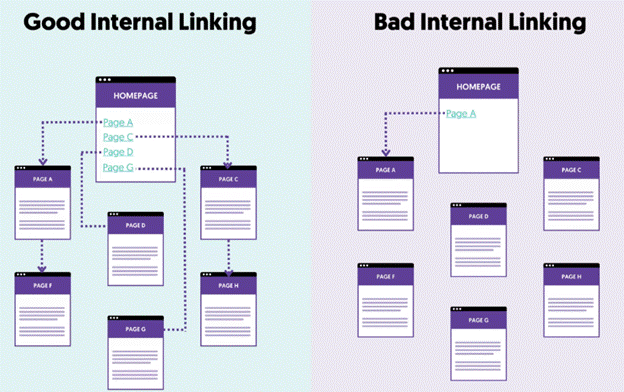
You can see that everything is linked to the homepage in a structured manner from the left image. This helps Google understand your website architecture and also increase visibility to relevant pages
5. Consolidate filter variants with canonical tags
E-commerce platforms like Magento often generate dozens of filter-based URLs for the same category pages.
That is, one URL for every size, color, or combination of sorting.
This causes duplicate content and inevitable crawl waste, since search engines treat each variant as a separate URL.
Shopify automatically adds canonical tags to product variants and filtered pages.
What to do:
Use a canonical URL to point the crawl bot to the page it should crawl.
For instance, a filtered page like /women/shoes?color=black&size=6 would include:
<link rel=”canonical” href=”https://shop.com/women/shoes” />
This signals to Google that the main category page (women/shoes) is the one that should be indexed. Not the (color=black&size=6) in the URL.
6. Improve site speed and JavaScript rendering
Google gives more crawl attention to sites that load quickly. If your site is slow, Googlebot will crawl fewer pages. This means some important pages may not get visited at all.
Many modern e-commerce sites rely on JavaScript to display content.
This can block Googlebot from seeing key information, especially if it has to wait for scripts to run.
To fix this:
- Use server-side rendering for JavaScript-heavy pages. This means your server delivers a fully loaded page to Google, not just the raw scripts.
- Pre-render pages for bots using tools like Prerender.io or Rendertron. This is useful for platforms like React or Vue.
Make sure you’re not wasting crawl budget on things that do not help your SEO. Block folders with internal tools, third-party scripts, or heavy media.
7. Remove links to out-of-season products
When outdated seasonal products stay linked across your site, Google will keep crawling them.
This slows down the discovery rate for new collections and wastes crawl budget on pages that no longer help your users.
You will also see this when past campaigns or holiday collections remain in menus, homepage banners, or some category hubs. Even when they’re outdated, Google will still follow those links because you haven’t redirected them.
What to do:
Remove and clean up these links as soon as the season ends by taking them out of the site navigation, hero section, or any part of your key internal linking structure.
You can also redirect the links to current product categories or live collections, which prevents them from being a part of your active crawl path.
Our technical SEO team here at HigherVisibility can support cleanup efforts, seasonal audits, and smart linking that drives results. Schedule a free call to learn how we can help.
8. Clean up your sitemap
A bloated sitemap filled with soft 404s, redirects, or staging URLs sends mixed signals to Google. This makes it harder for crawlers to focus on real, valuable content.
Here’s an example of what a problematic sitemap looks like:
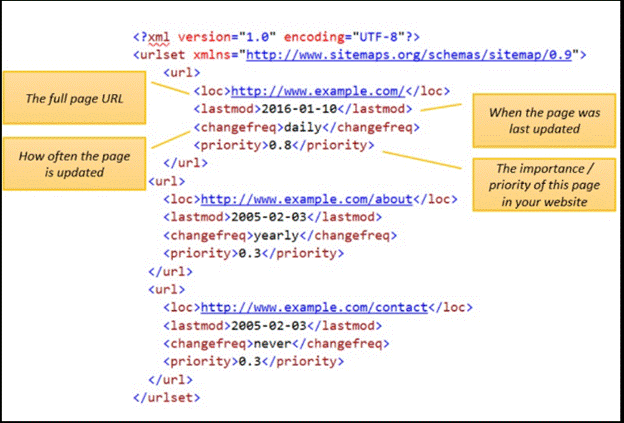
The issue with the site map above is that there are missing or inconsistent <lastmod> tags across entries, which don’t signal freshness.
There is hardly any grouping by content type, e.g., product pages vs. categories, and this lack of segmentation is an issue for sites with thousands of URLs.
Now, compare that to a clean site map like this below, which only includes live, indexable, and canonical URLs.
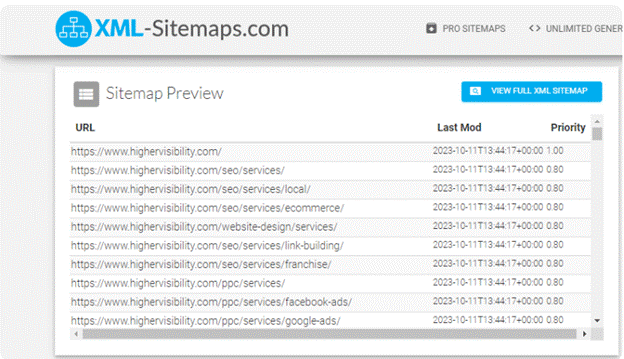
The cleaner the sitemap, the easier it is for Google to prioritize the right pages.
Next,
9. Use lastmod dates
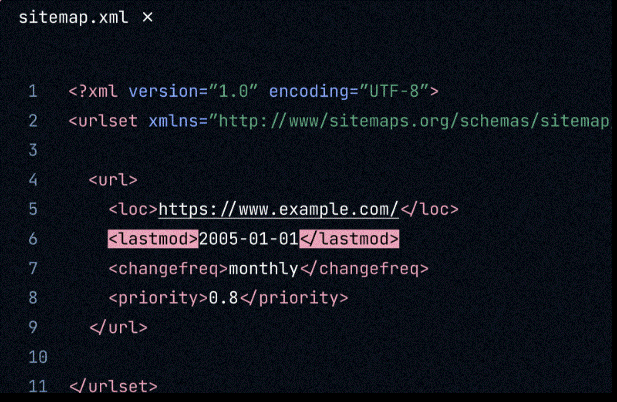
If you’re using XML sitemaps, make sure the <lastmod> value reflects real updates to the page. This helps Google identify what has been recently updated and what is outdated.
Also, don’t auto-update this field unless something on the page has actually changed.
Here’s a clear example of XML sitemap snippets that shows how well-implemented <lastmod> tags should look:
10. Make crawl reviews part of your SEO routine
When you fix crawl budget issues, they don’t remain that way permanently.
Your site changes and Google’s behavior shifts with it. Your site may produce new URL parameters, some links may show 404 errors, and you’ll always add new product pages.
When these happen, check your logs regularly and watch out for:
- Spikes in crawl activity on outdated pages.
- Drops in crawl activity on new collections or launch pages.
- Increases in 404s, 500s, or redirect chains.
Also, check how many crawled pages are actually getting indexed. If important URLs are in “Discovered – currently not indexed” in your GSC, your crawl budget is going to the wrong places.
The goal is to reduce crawl waste, so check your GSC regularly to know if Googlebot is focusing on the right pages.
If you don’t know if your website has crawl issues, here’s how to check:
How to Check Your Site’s Crawl Budget Performance
The first step is to look at what Google is crawling, and whether those pages are being indexed.
Go to Google Search Console and open the Pages report under Indexing. Pay attention to these labels:
- Crawled – currently not indexed: Google visited the page but did not add it to search.
- Discovered – currently not indexed: Google found the URL but hasn’t crawled it yet.
- Indexed: The page is in Google’s index and can appear in the search results.
If most of your crawled pages are not being indexed, something is wrong. If your new product pages or category hubs stay stuck in “Discovered,” that usually means your crawl budget is going elsewhere.
Use the processes explained above to fix the issues.
Conclusion
Crawl budget problems are easy to miss, both for small and large websites. But the signs are usually there.
New products will take longer to appear in search results, key categories will fall behind the pecking order, and Googlebot will keep hitting URLs that no longer matter and overlook the ones that do.
To fix this, check your GSC for where crawl time is spent, and make sure it aligns with your business needs.
This is how we approach it at Highervisibility. We work with e-commerce brands to:
- Audit server logs and GSC data to pinpoint crawl waste.
- Remove broken, duplicate, or outdated URLs from sitemaps.
- Strengthen internal links to help Google discover high-value pages faster.
- Monitor crawl patterns over time to catch problems before they affect the website.
Crawl budget affects how quickly your most important content gets seen. With the right fixes, your site becomes easier to crawl, rank, and more aligned with what your customers are searching for.


Enter your email to get strategic insights, a plan of action, and pricing options.
From Our Insite Blog
We believe that SEO requires an all-encompassing approach to ensure a sustainable future for your site and achieve your goal…. conversions.

If you are like me, and have been looking into SEO companies for awhile and/or have trusted a couple that haven't worked out, you are in the right place and in good hands with HV.