How Small Businesses Can Use AI-Driven Predictive Analytics to Increase Revenue

Author’s note: This post has been developed by our internal Innovation team to provide small-to-medium business owners with actionable, cutting-edge insights into utilizing modern AI frameworks for sustainable financial growth.
For years, small business owners have had to rely heavily on backward-looking data. You look at last month’s profit and loss statement, analyze last quarter’s sales traffic, or review a spreadsheet of historical inventory trends. While valuable, this approach is the business equivalent of driving a car while looking strictly through the rearview mirror. It tells you exactly where you have been, but very little about the curve in the road directly ahead.
Until recently, looking through the windshield required a massive budget, an army of data scientists, and custom-built machine learning infrastructure.
But the landscape has fundamentally shifted. We have reached a point where sophisticated AI-driven predictive analytics tools are democratized, incredibly affordable, and seamlessly integrated into platforms that small-to-medium businesses (SMBs) use every day.
Let’s clear up a major misconception right now: these are not multi-thousand-dollar enterprise commitments. You do not need to hire an outside software engineering firm or swallow massive monthly subscription fees to tap into predictive AI. Many of the most powerful capabilities are hidden inside free tools you already use, or low-cost integrations that cost less than a tank of gas.
As a business owner, you do not need a PhD in data science to unlock this power. You just need to understand how to leverage it to answer the questions that drive actual revenue.
What Is AI-Driven Predictive Analytics?
At its core, predictive analytics uses historical data, statistical algorithms, and modern machine learning techniques to identify the likelihood of future outcomes. Instead of simply telling you what happened, AI analyzes thousands of minor data points across your past operations to tell you what is likely to happen next and, crucially, how to profit from it.
Traditional analytics might tell you that foot traffic or web clicks dropped by 12% last November. AI-driven predictive analytics tells you which specific segment of your customer base is 80% likely to stop buying from you next month, allowing you to intervene before that revenue vanishes.
When building a comprehensive digital strategy, whether you are looking into advanced automated workflows or foundational organic visibility, data structure dictates your success. For an SMB, predictive analytics means shifting from a reactive business model to a proactive one, helping you maximize the value of every dollar spent on marketing, inventory, and labor.
The same predictive modeling principles are increasingly being applied to search visibility. Businesses are beginning to use AI not only to forecast customer behavior, but also to identify emerging search trends, anticipate content demand, and improve their visibility across LLMs. As search evolves beyond traditional rankings, predictive analytics is becoming an important component of modern Generative Engine Optimization (GEO) strategies.
4 Proven Use-Cases For Predictive Strategies (and How To Do Them)
1. Predictive Lead Scoring & Pipeline Optimization
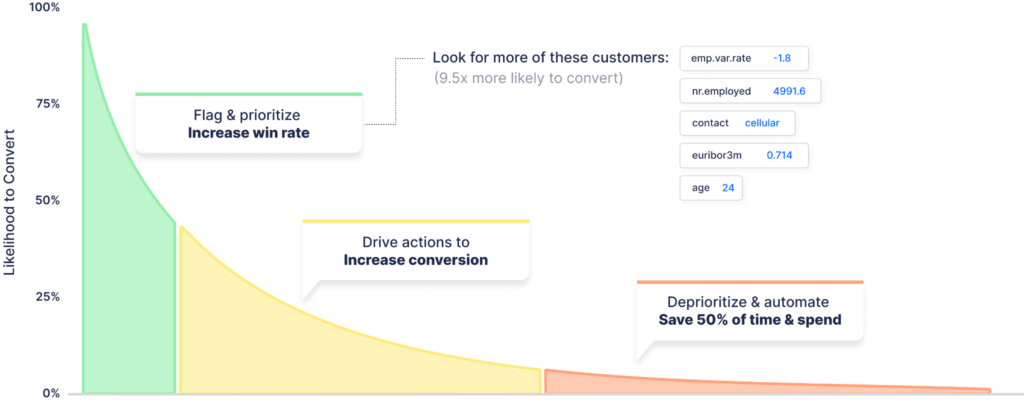
Predictive lead scoring allows inbound businesses to mathematically prioritize their sales pipelines. Instead of treating every form submission equally, this process dynamically analyzes incoming behavioral or textual data against past performance metrics. This ensures your sales team instantly focuses their energy on prospects with the highest statistical probability of closing, rather than wasting valuable hours on unviable or spam inquiries.
What You Need to Get Started
- Centralized CRM (e.g., HubSpot CRM Starter Tier): $0 to $20/month. Used to capture, organize, and log all incoming digital leads.
- No-Code AI Platform (e.g., Akkio): Free trials available; entry-level plans start around $50/month. Connects directly to data sheets or CRMs to build custom predictive models without code.
- Zapier (Free or Starter Plan): $0 to $20/month. Operates as the automated data bridge passing information between your CRM and the AI layout.
Step-by-Step Setup Instructions
- Export Historic Outcomes: Download a clean CSV file of your past 24 months of sales leads, ensuring you have one column for the initial intake description/behavior and one column tracking the final outcome labeled simply as “Closed/Won” or “Lost/Unviable.”
- Train the Predictive Engine: Upload the CSV into your no-code AI engine, select the final outcome column as your target variable, and let the platform identify semantic pattern weights.
- Map Live Forms via Zapier: Build a pipeline automation that triggers whenever a new lead enters your CRM, instantly pushing the submission data to your trained AI model.
- Write Back the Probability Score: Configure the automated workflow to take the percentage score generated by the AI model and update a custom “Lead Value Probability” field directly on that user’s contact profile.
- Establish Priority Alerts: Build an internal routing rule in your CRM that sends an immediate text or notification to your sales team whenever an incoming lead clocks a conversion probability score over 80%.
How To Make This Specific For You: AI Prompt to Customize This Scoring Model For Your Business
Copy and paste the prompt below into any free LLM (like ChatGPT, Claude, or Gemini) to map out a precise text-parsing or behavior-scoring blueprint tailored to your unique sales cycle.
Copy/Paste Prompt: “I run a small-to-medium business in the [Insert Your Industry] space, and I want to set up a low-cost predictive lead scoring framework using my CRM and a no-code AI engine like Akkio.
Act as an expert data scientist and automation engineer. Based on my industry, please list:
- What specific text-based phrases or customer behavioral data from my intake forms I should look for that historically correlate with a ‘High-Value/Highly Likely to Close’ lead.
- What common phrases or red flags indicate a ‘Low-Value/Spam’ lead.
- Provide a step-by-step logic layout I can use to build my predictive data model matching my exact business structure.”
Real-World Application: Local Legal / Law Firm
A personal injury law firm receives roughly 150 digital inquiries a month via local ads. Historically, paralegals spent days calling every lead back in the order they arrived, frequently losing high-value accident cases because they were bogged down filtering out spam. By deploying this template, when an inquiry arrives stating, “Car accident on the interstate, police report filed, missed three days of work,” the AI recognizes text patterns matching past multi-million dollar settlements and assigns a 94% Value Probability Score. The team calls them back within 180 seconds, securing the client instantly.
2. Customer Lifetime Value (LTV) Modeling & Next-Best-Action Marketing
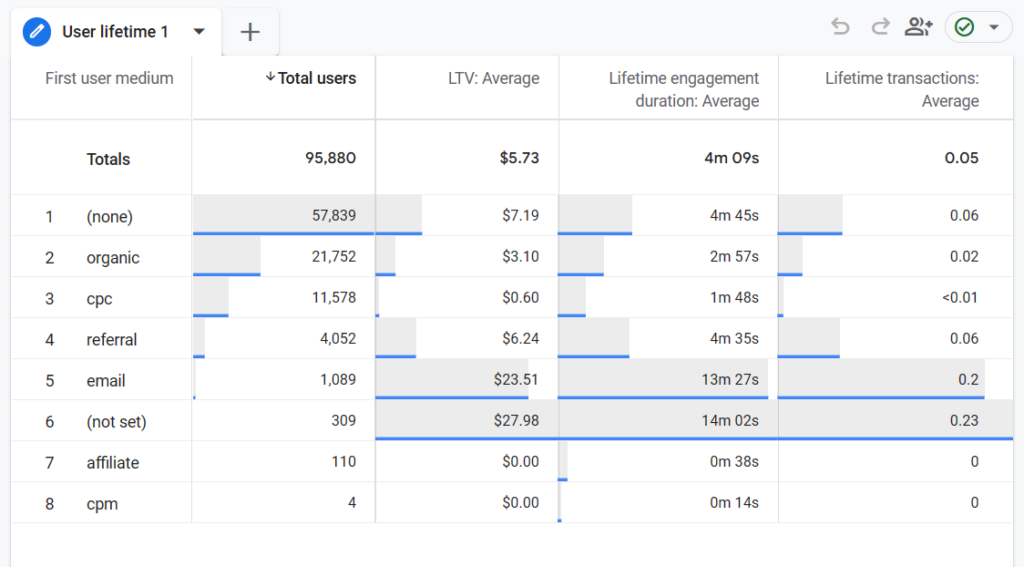
Predictive LTV modeling tracks individual consumer behavior patterns to forecast future purchasing windows and long-term financial value. By letting machine learning analyze historical purchase intervals, category browsing, and site interaction speeds, you can precisely anticipate what product a specific user is most likely to buy next, and exactly when they will be primed to purchase it.
What You Need to Get Started
- Google Analytics 4 (GA4): $0 (Completely Free). Gives small businesses native access to built-in Predictive Metrics models out of the box.
- E-Commerce Storefront (e.g., Shopify): Standard tiers (~$39/month). Provides automated customer transaction records.
- Automated Marketing Tool (e.g., Klaviyo): Free tiers available; scales cheaply based on subscriber count. Handles dynamic personalized messaging workflows.
Step-by-Step Setup Instructions
- Activate Predictive Audiences: Navigate to the Audiences tab in Google Analytics 4 and configure the pre-built templates for predictive metrics, focusing on segments like “Likely 7-day purchasers.”
- Sync Web Segments to Marketing Tools: Create a live integration data link that pushes these dynamic GA4 predictive cohorts directly into your email and SMS automation platform.
- Map Behavioral Purchase Chains: Review your historical catalog to find high-correlation cross-sells (e.g., users who buy item X typically buy item Y roughly 60 days later).
- Build Automated Message Triggers: Construct a communication workflow that activates the exact moment a customer is dynamically added to a “High Propensity to Buy” predictive list.
- Deploy Dynamic Personalization: Use merge tags within your automated templates to display the precise products or categories the model indicates the customer is looking for, paired with a time-sensitive incentive.
How To Make This Specific For You: AI Prompt to Map Your Next-Best-Action Marketing Sequence
Copy and paste this prompt into your preferred free generative AI tool to identify high-converting cross-sell windows and dynamic customer behaviors unique to your product line or service list.
Copy/Paste Prompt: “I manage an e-commerce brand/digital company that sells [Insert Primary Products/Services]. I want to leverage the predictive analytics features in Google Analytics 4 (GA4) and my email/SMS marketing tools to build hyper-personalized purchase loops.
Act as an e-commerce retention specialist and predictive marketer. Please give me:
- A list of 3 high-probability ‘Next-Best-Action’ purchasing paths based on common consumer patterns in my niche (e.g., if they buy product X, what are they statistically likely to want next, and when?).
- The exact trigger parameters I should set up for my automated messaging flows when a user is flagged as ‘Likely to Purchase in the Next 7 Days’ by a predictive algorithm.”
Real-World Application: National E-Commerce Site
An online apparel boutique wants to scale its repeat orders. Instead of sending a blanket email blast to their database, they utilize GA4’s predictive audience layers. The system isolates a cluster of shoppers who purchased a high-end dress two months ago and have logged back onto the store twice in the past 48 hours to view accessories. The AI drops them into an automated flow, triggering a tailored email showing the matching jewelry pieces they were browsing. The brand achieves a 22% increase in average order value (AOV) without manually running a single ad campaign.
3. Predictive Demand Forecasting & Capacity Scheduling
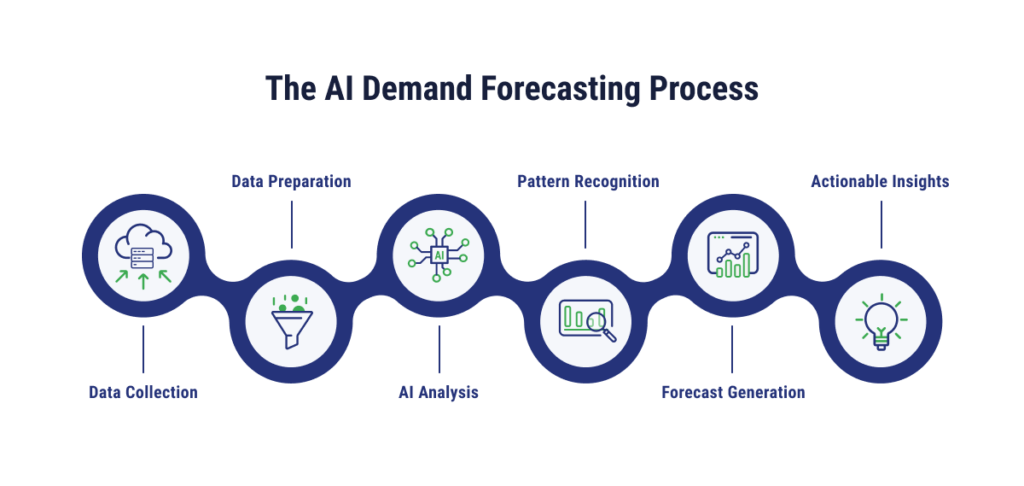
Predictive demand forecasting goes beyond simple calendar-based seasonality by correlating past internal operational logs with real-world external vectors. By examining how historical customer requests sync with local economic indexes, weather shifts, and macro market changes, businesses can mathematically forecast seasonal strain, scheduling personnel and capacity perfectly to avoid missing out on peak windows.
What You Need to Get Started
- Field Management / Operations Tool (e.g., Housecall Pro): Standard subscription tracking your historical service records and dispatch logs.
- Google BigQuery Sandbox: $0 (Free tier provides up to 1TB of monthly data queries). Used to pool historical operational datasets.
- Advanced LLM Framework (e.g., ChatGPT Plus or Claude Pro): $20/month. Serves as your on-demand data analyst to process complex file correlations.
Step-by-Step Setup Instructions
- Compile Operational History: Export your total daily service tickets or sales volume reports from the past three years into a single, comprehensive spreadsheet.
- Overlay External Data Fields: Import public time-series data matching your primary external business driver (such as local weather history, regional housing developments, or local event calendars).
- Leverage the AI Analyst Tool: Upload your consolidated data files into a secure, premium LLM workspace and prompt the system to calculate regression weights and non-obvious operational correlations.
- Generate a Demand Matrix: Instruct the model to build a 30-day forward-looking capacity map detailing your expected daily volume thresholds based on upcoming variables.
- Optimize Capacity Allocation: Adjust your staffing matrices, on-call schedules, or inventory replenishment orders to reflect the predicted volume curves before the rush hits.
How To Make This Specific For You: AI Prompt to Correlate Operations With External Data
Copy and paste this prompt into an LLM to build a contextual framework that uncovers how weather, local market shifts, and community factors impact your operational strain.
Copy/Paste Prompt: “I own a local service company in the [Insert Your Industry/Niche] sector. I am trying to build a forward-looking demand forecasting model by feeding my historical appointment logs into a secure LLM workspace.
Act as an operations data analyst. Tell me:
- What external datasets (e.g., local weather indexes, construction permits, local event calendars) I should pull for free online to combine with my internal sales spreadsheets to spot hidden revenue correlations.
- Give me a specific prompt or data instruction matrix I can run against my combined data file to force the AI to accurately predict our staffing capacity needs for the upcoming 30 days.”
Real-World Application: Local HVAC, Plumbing & Electrical Company
A local HVAC provider exports their multi-year dispatch data into ChatGPT Plus alongside local humidity forecasts. The AI highlights a hidden trend: whenever local humidity crosses 75% alongside consecutive 90-degree days, AC compressor breakdowns surge by 140% in specific older zip codes. The company schedules extra technicians for weekend shifts in advance, launching targeted “Beat the Heat” outreach to those specific neighborhoods, securing market share before their competitors’ phones even ring.
4. Time-Series Capacity & Volume Forecasting
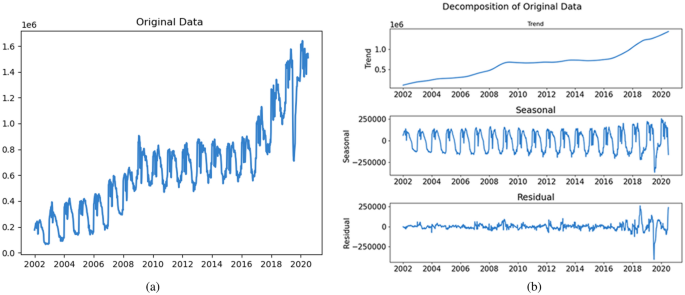
Capacity and volume forecasting applies mathematical smoothing algorithms to past operational metrics to predict exactly how many clients, consumers, or patients will walk through your doors on a given day or hour. This eliminates structural revenue leaks, ensuring you minimize wait times and protect service quality without over-allocating payroll during quiet operational lulls.
What You Need to Get Started
- Google Sheets / Excel: $0 (Free/Standard). Built-in spreadsheet tools can handle time-series forecasting calculations natively.
- Internal Operational Logging Software: $0. Any baseline administrative tool or point-of-sale platform that cleanly logs check-in data with a time and date stamp.
Step-by-Step Setup Instructions
- Isolate Hourly Check-In Metrics: Pull your customer arrival or transaction volume counts broken down systematically by week, day, and hour for the last 12 to 24 months.
- Format into Time-Series Columns: Organize your sheet cleanly into two chronological columns: Column A for the date/time anchor, and Column B for the total volume of client touchpoints recorded.
- Run the Native Forecast Tool: Highlight your dataset, navigate to data settings, and activate the built-in Forecast Sheet feature (which runs a Triple Exponential Smoothing algorithm behind the scenes instantly for free).
- Project Future Operational Timelines: Adjust your forecast timeline settings to project user volumes across the upcoming quarter, allowing the system to account for historical confidence intervals.
- Adjust Operational Staffing Blocks: Build your employee work rotations directly around the resulting predictive chart, matching your staffing count to the forecasted patient peaks.
How To Make This Specific For You: AI Prompt to Construct Your Spreadsheet Forecasting Matrix
Copy and paste this prompt into any free LLM tool to get an exact mathematical blueprint for structuring your time-series columns within Google Sheets or Excel.
Copy/Paste Prompt: “I run a local business centered around client check-ins and appointments in the [Insert Your Industry] space. I want to use the native, free time-series forecasting features within my standard spreadsheet software to optimize my employee shift rotations and reduce customer wait times.
Act as a workforce management specialist. Please provide:
- A clear guide on exactly how I should structure my internal hourly or daily transaction check-in data so that spreadsheet algorithms can read it flawlessly.
- Direct instructions on how to use Excel or Google Sheets’ built-in forecasting tools to project our peak resource strains, taking into account our industry’s common seasonal variations.”
Real-World Application: Local Urgent Care / Doctor Clinic
A local walk-in medical center faces an operational bottleneck: unpredictable wait times are causing patients to walk away to competing facilities. By exporting past patient arrival data into Google Sheets and running a native time-series forecast model, the clinic uncovers a highly predictable 30% surge in pediatric cases during the second week of October, specifically compressed between 3:00 PM and 7:00 PM. The clinic dynamically adjusts its staffing matrix, adding a part-time nurse practitioner to that explicit afternoon window while scaling back underutilized morning hours. Wait times drop under 15 minutes, maximizing patient satisfaction and patient volume revenue without bloating total weekly overhead.
SMB-Friendly Predictive AI Tools at a Glance
Use this table to quickly compare low-cost, accessible tools that can sit on top of your existing operational stack to provide predictive insights instantly.
| Tool / Platform Class | Best For | Standout Predictive Capability | Pricing Tier | Setup Complexity |
| Google Analytics 4 (GA4) | E-commerce & Digital Brands | Built-in churn and purchase probability tracking for web traffic | Free ($0) | Low-Medium |
| Akkio | Professional Services & Lead Gen | Drag-and-drop lead scoring and operations forecasting | Low ($) (Free trial available) | Low (No code required) |
| HubSpot AI (Starter) | B2B Service Providers & Contractors | Automated deal-win probability and pipeline bottlenecks | Low ($) (Basic features are free) | Low |
| Google Sheets (Forecast Sheet) | Clinics, Retailers, and Local Brands | Historical trend projections based on time-series data | Free ($0) | Medium (Requires basic spreadsheet layout) |
Pricing tiers are approximate for SMB entry levels: Free = $0, $ = under $50/mo. Exact costs scale gently with data volume.
Before You Start: 5-Step Framework to Implement Predictive AI
If you are ready to move from concept to execution, follow this straightforward roadmap to ensure your investment yields measurable revenue growth.
Step 1: Clean Up Your Baseline Data
AI cannot predict the future if it is analyzing a chaotic past. Before adopting any tool, ensure your foundational data is organized. If your customer records are scattered across three different spreadsheets, a legacy CRM, and an unmonitored inbox, take the time to sync them into a single source of truth while removing duplicates, inaccurate, and junk data.
Step 2: Define a Singular, High-ROI Question
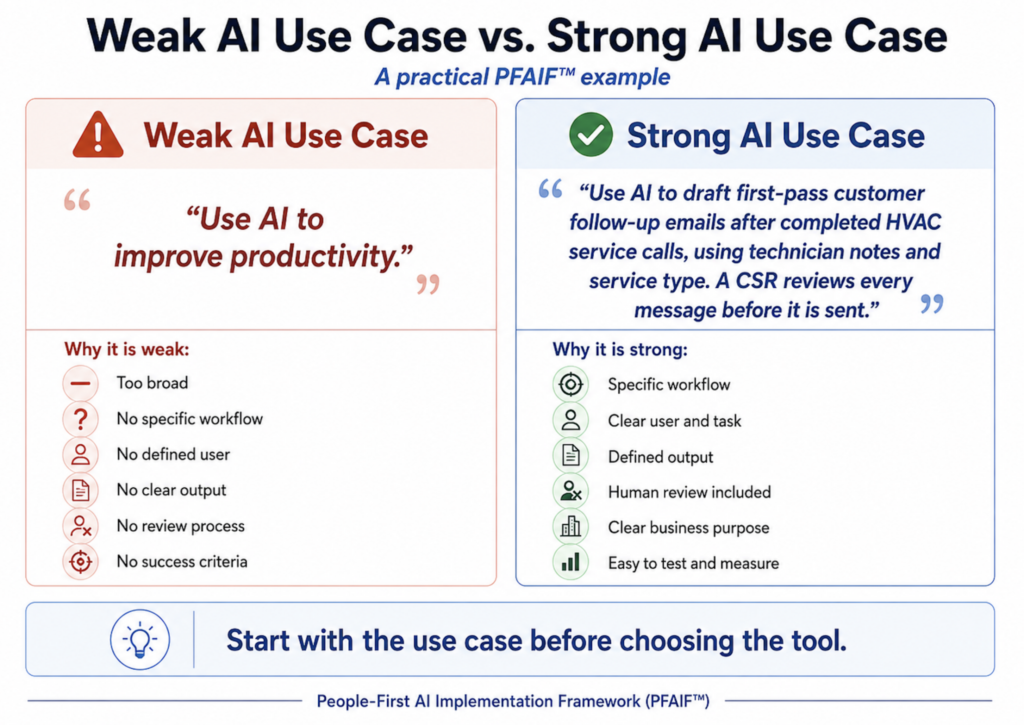
Do not try to solve every business challenge at once. The first two pillars of the People-First AI Implementation Framework (PFAIF) are to perform a comprehensive workflow assessment and to define a specific use case. Start by identifying your single biggest revenue bottleneck. Focus on a single problem to make it easy to select the right tool and measure success cleanly.
Step 3: Connect Your Data to a Low-Code/No-Code Layer
Once you have selected a tool that aligns with your question, connect your data. Modern no-code platforms allow you to upload data sources directly via secure CSV uploads or API connectors. The AI will scan your historical records, identify hidden patterns, and build a customized predictive model unique to your business operations.
Step 4: Automate the Accompanying Workflow
Predictive data is only as good as the action it inspires. The real magic happens when you pair predictive insights with workflow automation. Turn your AI predictions into immediate, automated operational directives across your team’s pipelines.
Step 5: Monitor, Tweak, and Scale
Algorithms learn over time. Monitor your predictions against real-world outcomes weekly. As your business gains more customers and generates more data, your predictive models will naturally become sharper, allowing you to rely on them more heavily as you scale.
Keeping AI Grounded: Pitfalls to Avoid
While predictive analytics can feel like a superpower, it is crucial to avoid common implementation mistakes that can skew your results.
- The “Garbage In, Garbage Out” Rule: If your historical data is inaccurate, outdated, or fundamentally flawed, the AI will make highly confident, completely incorrect predictions. Prioritize data integrity above all else.
- Incentivizing the Human Element: AI provides probabilities, not absolute certainties. A high-scoring sales lead might still turn out to be a poor fit, and a flagged churn risk might just be a client on an extended vacation. Use AI to guide your human team’s efforts, never to replace their intuition entirely.
- Over-Complicating Your Tech Stack: Choose tools that match your team’s current technical comfort level. A simpler, well-utilized built-in CRM feature will always generate a higher ROI than a highly advanced standalone data platform that nobody on your staff understands how to operate.
Driving Growth Without Expanding Overhead
The true beauty of using AI-driven predictive analytics as a small business lies in operational efficiency for specific and niche use cases. It allows you to squeeze significantly more revenue out of the resources you already possess. You do not need to double your marketing budget or hire a larger team to scale; you simply need to use predictive data to ensure your current resources are focused exactly where the revenue is waiting to be claimed.
By anticipating your customers’ needs before they even articulate them, you set your business up for a sustainable, resilient future in an increasingly data-driven marketplace.


Enter your email to get strategic insights, a plan of action, and pricing options.
From Our Insite Blog
We believe that SEO requires an all-encompassing approach to ensure a sustainable future for your site and achieve your goal…. conversions.

The biggest thing we saw right off the bat was organization. They do what they say they are gonna do. I'd tell anyone there is nobody else I'd recommend than HigherVisibility.