How to Calculate Your PPC ROI (A Step-by-Step Guide)

Every dollar you put into paid search has to earn its place when leadership asks whether the spend is working. PPC ROI (pay-per-click return on investment) measures the profitability of your ad campaigns against what you spend to run them. It helps you answer questions like:
- What ads drove the most results?
- Which keywords converted the most and returned the most profit?
- How can you improve your campaign performance?
Your real job isn’t tracking clicks, it’s showing your CEO or CRO that paid search returns more than it costs. Understanding how your PPC campaigns affect the bottom line helps you make smarter decisions for your next campaigns, track their profitability, and grow revenue you can defend.
Difference Between PPC ROI and ROAS
PPC ROI (return on investment) is the total return, or profit, from all your ad and marketing campaigns. It gives you a complete view of campaign profitability because it factors in every overhead cost, including:
- ad spend
- ad management fees
- outsourcing fees (a graphic designer, copywriter, or video editor)
- landing page development
- PPC analytics software
- keyword research tools
- labor (by the hour)
ROAS (return on ad spend) measures the revenue generated from a single ad campaign, keyword, or ad group. It doesn’t give you the broader picture across all your campaigns the way ROI does.
That’s why ROAS works well for performance-driven campaigns, where you need to quickly decide whether to continue, pause, or scale a campaign. The formula for ROAS is:
ROAS = (Revenue from ad campaigns / Cost of running the ads) × 100
Here’s why the distinction matters. Say you spend $10,000 on ads and generate $40,000 in revenue. Your ROAS is 400%, which looks like a clear win.
Now add the rest of your costs: $5,000 for management, tools, and labor, plus $19,000 in product and fulfillment costs. Your total cost is $34,000, so your actual profit is $6,000. That 400% ROAS quietly becomes an ROI of about 18%.
A strong ROAS can hide a weak ROI once every cost is on the table, which is exactly why leadership cares about the second number.
How to Calculate ROI for Paid Ads
The first step is identifying and tracking your conversions. Conversions can be website traffic, phone calls, event registrations, downloads, or lead generation actions like trial signups and sales. They’re the actions your potential customers take once they reach your site.
Pro Tip: Track your ad conversions with UTM parameters or a conversion tracking tool. You can also install Google conversion tracking on your landing page.
Once you know the value of your conversions, add up every cost tied to your campaigns. Then run the numbers through the ROI formula:
ROI = ((Revenue − Total Costs) / Total Costs) × 100
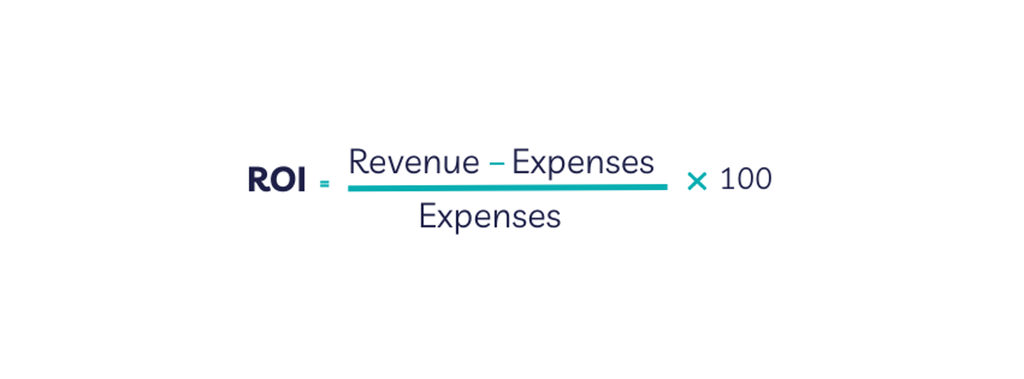
Here’s a worked example. Say you spend $5,000 on ads and another $2,000 on management, tools, and labor, for $7,000 in total costs. Those campaigns generate $21,000 in tracked revenue. Your ROI is:
(($21,000 − $7,000) / $7,000) × 100 = 200%
That 200% means you earned $2 in profit for every $1 you invested.
What Counts as a Good PPC ROI
There’s no universal “good” number, and any guide that hands you one is guessing. When a client asks us “is this working?”, we don’t point to a benchmark, we tie the answer to their margins and sales cycle. A high-margin ecommerce brand and a professional services firm with a three-month sales cycle can run the same ROI and reach very different conclusions about whether it’s healthy.
For a reference point, Google’s own Economic Impact research estimates that businesses earn about $2 in profit for every $1 they spend on Google Ads. Treat that as a floor to build toward, not a promise. Your target should reflect what a closed customer is actually worth to your business.
How to Improve PPC ROI
Here are six ways to improve your PPC ROI once you know where you stand.
1. Cross-Check With Data
Before you touch a keyword or a bid, check your data to understand what’s working, what isn’t, and why. It’s the first thing our team does before adjusting any campaign, because best practices are useless if you don’t know what your current campaigns are actually doing.
Start by evaluating your campaigns from a funnel perspective, mapped to the user journey and your goals. If you’re running ads to expand reach, your efforts target the awareness and consideration stages. That might mean:
- using eye-catching product visuals
- targeting informational and navigational keywords
- displaying reviews or user-generated content from previous customers
If your landing page doesn’t support those stages, the traffic won’t convert. And even a page built to convert needs usability testing to see how real users interact with it. Session recordings and heat maps show you where people drop off, and split tests on your ad copy, headlines, and CTAs help you improve click-through rates.
Your campaign goals also determine the KPIs you track. For the reach example above, you’d watch impressions, click-through rate, and engagement to gauge how well the campaign is performing. A few other things to check:
- Ad spend. Is your ROI low because your budget is too small? A well-performing ad often does better with more budget, and the reverse is true too.
- Ad groups. Are some ad groups bringing no conversions? Pause the ad groups or keywords that aren’t converting.
- Placement. If your ads perform better at the top of the results or on specific sites, shift more budget toward those areas.
- Keywords and search terms. Are you paying for terms that don’t convert? Remove them and add them to your negative keyword list, which we’ll cover next.
Use this data to decide whether to optimize your current campaigns or scale your budget for a better ROI.
2. Choose the Right Keywords
As with SEO, the keywords you target can make or break a PPC campaign. Your keyword choice and relevance shape your quality score, which influences your ad placement and cost-per-click (CPC). A few tips:
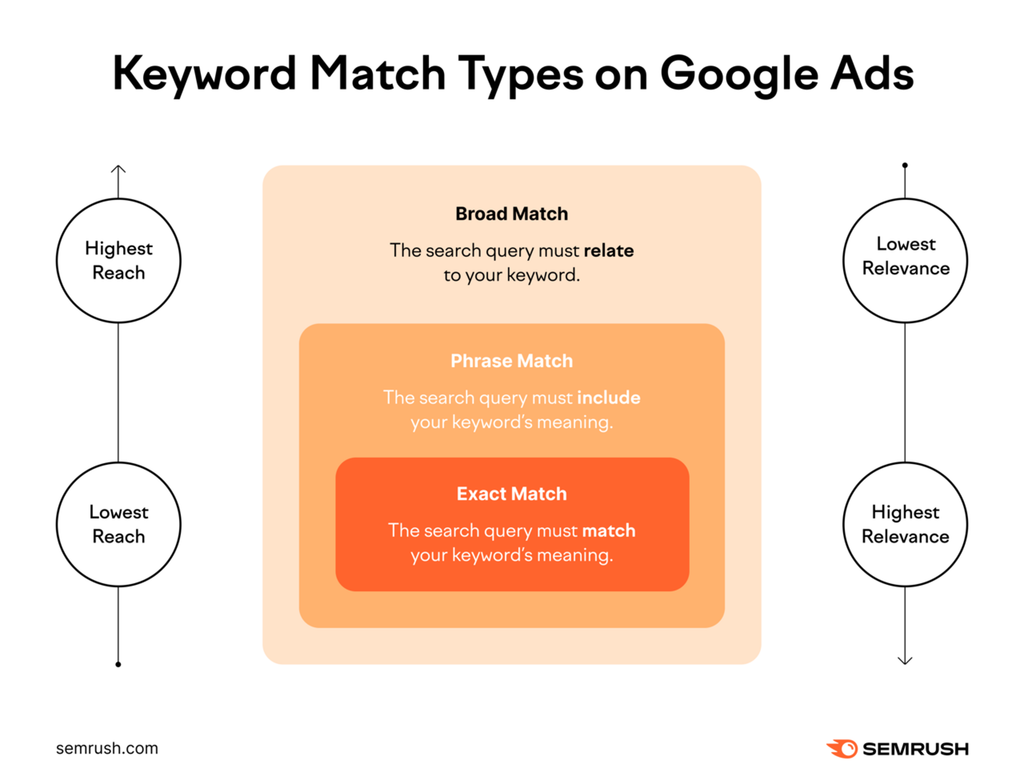
- Use keyword match types. If your goal is reach, broad match keywords like “best CRM” appear for related queries, giving you the highest reach and lowest relevance. If your goal is conversion, exact match keywords like “best CRM for small business” appear for precise queries, with the lowest reach and highest relevance. Google’s guide to keyword matching options breaks down each type.
- Leverage negative keywords. These are terms you don’t want your ads to appear for. If you sell women’s clothing for all ages, you can set a broad match for “women’s clothing” and add negative keywords for “men’s clothing,” “menswear,” and similar terms. This saves real money by keeping you out of searches that will never buy from you. Google explains the setup in its guide to negative keywords.
Both strategies are the exact steps we took to lift West Memorials’ ad conversions. West Memorials is a Memphis-based company that creates custom-designed headstones and monuments. Before they came to us, they struggled to reach their actual audience and communicate their offerings to the people who needed them.
Here’s what we did differently. We ran comprehensive keyword research to target long-tail keywords tied to their specific services, the same exact-match thinking described above. We used negative keywords to filter out irrelevant searches, including locations outside their target area.
Then we combined that with geotargeting, bid adjustments, ad extensions, and ad copy written for their audience. The result was a 58.55% increase in conversions and a 39.33% increase in cost per lead (CPL).
Pro Tip: Focus on long-tail keywords to attract qualified searchers and higher-quality leads. They also tend to carry lower competition and a lower cost per click.
3. Use Automated Bidding Strategies
Automated bidding in Google Ads lets Google adjust your bids and place your ads where they’re most likely to perform. Instead of updating bids manually or guessing what drives conversions, you let the system optimize toward your goal. You have several options:
- Maximize conversion value. This strategy drives the conversions worth the most to your business. If your average order value is $50 but some customers spend $100 and others $30, Google works to reach the higher-value buyers. Assign accurate conversion values and set up conversion tracking correctly for this to work.
- Target CPA (tCPA). Also called target cost per action, this helps you win more conversions at your desired cost. You can set minimum and maximum bid limits so Google doesn’t over- or underspend per conversion.
- Target ROAS (tROAS). With tROAS, you set the return you want on each dollar spent. Like tCPA, you can set bid limits so Google uses your budget efficiently.
- Target impression share. This raises your chances of appearing on the results page, with three placement options: the absolute top, above the organic results, or anywhere on the page.
Separate from the automated strategies above, video campaigns use cost per view (CPV) bidding, where you set a bid for each view or interaction with a video ad, so you’re charged only when someone watches your video or clicks a call to action.
Automated bidding leans heavily on the performance data from your past campaigns, so build up a solid data foundation before you automate.
We usually recommend automated bidding once a campaign has enough conversion history to learn from. Before that point, manual control protects your budget. You can read more in Google’s guide to automated bidding.
4. Bring Back Lost Users With Remarketing
PPC remarketing shows your ads to people who have already visited your site. Most first-time visitors leave without converting, and remarketing gives you a second chance to reach them, pull them back into the funnel, and move them toward a purchase. If you sell men’s shoes, for example, you can build a “Nike men’s sneakers” ad to re-target people who viewed that specific page, putting your ad in front of a highly interested audience.
You can retarget visitors several ways:
- By purchase history. These users bought once and haven’t returned. Use cross-sell, upsell, or special-offer campaigns to encourage repeat purchases.
- By content interaction. These users browsed your pages but didn’t act. Use dynamic remarketing to show them the exact products they viewed, paired with social proof.
- By conversion intent. These users showed clear interest, maybe even added items to a cart, but didn’t check out. Rekindle interest with discounts, coupons, or free shipping.
- By behavior. This targets users based on the pages they visit and how long they stay. Serve ads featuring the exact products or services they engaged with, and build similar audiences to reach comparable buyers.
- By demographics. This serves ads based on attributes like age, gender, income, or location. Create personalized ads for each group, and use time-sensitive deals to drive quick action.
Remarketing keeps your brand top of mind for buyers who were already interested, which is often the cheapest conversion you’ll find.
5. Improve Landing Page Quality
You can get everything else right, the budget, the bidding strategy, and the keywords, but without a quality landing page your ads won’t convert. Your landing page also directly affects your quality score, which shapes your CPC.
Its quality comes down to relevant, useful content, trustworthiness, and on-page experience. Good copy can carry a weak design, but strong design can’t rescue weak copy. Both matter, and your page needs them working together.
Create Compelling, Clickable Ads
Your ad is the gateway to your landing page. It’s the first thing users see, so it needs to be relevant, clear, and compelling.
Start with your audience: Who are you targeting, what do they want to see, and what stage of the funnel are they in? Your ad should answer “what’s in this for me?” in a second.
Align your ad copy to the customer journey. Most platforms reward relevance, so focus your messaging on the user’s specific need and how you solve it. A hard sell rarely lands for someone still researching, so match the message to the intent.
You can also use value propositions like a limited-time offer or free shipping to create urgency and earn the click. If you’re running display or shopping ads, use high-resolution visuals in the correct formats and sizes, and finish with a strong call to action.
Match Your Landing Page to Your Ad
Getting the click is only half the job. To turn it into an action, match your landing page to your ad copy, which usually means building a dedicated landing page for each campaign.
A mismatch between what the ad promised and what the page delivers sends users straight back to the results. Someone searching for a mattress will leave fast if your page leads with bed frames. Keep the search query, the ad, and the landing page working as one.
Use an Attractive Landing Page Design
Align your page’s content, design, and structure to the user’s search intent so every element supports the next. A few reliable tips:
- improve page speed on your landing pages
- add social proof from previous customers to build trust
- keep the focus on your potential customers
- optimize your landing page for mobile devices
- add a no-index tag if the page exists only for paid ads
6. Test, Monitor, and Improve Your Campaigns
The right data makes the difference in your campaigns. It helps you understand your users, identify your best-performing areas, improve your conversion rate, and measure how each ad influences your ROI.
The most common form of testing is A/B testing, where you compare variations of an ad to see which performs better. A simple example is running the same ad with different CTA placements.
If you haven’t already, connect your Google Analytics 4 property to your ads account. Together they give you richer audience data, better targeting, and a fuller view of your ad revenue. From there, track the metrics that matter:
- Conversion rate. The percentage of people who act after clicking your ad.
- Click-through rate. Clicks on your ad compared to total impressions.
- Average cost per click. What you pay for each click.
- Cost per acquisition. The total cost to acquire a new customer.
- PPC ROAS. Your ad profitability against your ad spend.
- Impression share. How often your ad shows compared to its total eligible impressions.
Account for Attribution and Delayed Conversions
Here’s where a lot of ROI reporting goes wrong. Last-click attribution gives all the credit to the final click, which can badly misstate what your campaigns actually earned. A multi-touch view spreads credit across the touchpoints that influenced the sale, and it tends to tell a truer story.
This matters most for the lead-gen and B2B clients we work with, where the sale rarely closes on the click. We measure ROI for accounts where a phone call, a booked appointment, or a signed contract lands weeks after someone first clicked an ad.
If you only count online conversions, you’ll undervalue paid search and cut budget that’s actually working. Import your offline conversions, factor in customer lifetime value, and your true ROI picture changes, often for the better.
Don’t Forget SEO
While you optimize your campaigns for higher ROI, integrate your PPC strategy with SEO for stronger overall performance. BrightEdge research found that organic and paid search together drive the majority of web traffic, and combining them lifts your visibility, click-through rate, conversions, and ROI.
That’s what we do at HigherVisibility. Instead of treating PPC as an island, we combine it with SEO for sustainable lead generation, so both channels work in tandem to improve your marketing ROI. Request a proposal and we’ll build a combined SEO and PPC strategy tied to the results your leadership expects.
Sources
- Google Economic Impact, Methodology. https://economicimpact.google/methodology/
- BrightEdge, Organic Share of Traffic Increases to 53%. https://www.brightedge.com/blog/organic-share-of-traffic-increases-to-53
- Google Ads Help, About keyword matching options. https://support.google.com/google-ads/answer/7478529
- Google Ads Help, About negative keywords. https://support.google.com/google-ads/answer/2453972
- Google Ads Help, About automated bidding. https://support.google.com/google-ads/answer/2979071


Enter your email to get strategic insights, a plan of action, and pricing options.
From Our Insite Blog
We believe that SEO requires an all-encompassing approach to ensure a sustainable future for your site and achieve your goal…. conversions.

Can't recommend them enough! I had a great experience with them and saw results but made the mistake of thinking a cheaper agency was better. Boy was I wrong. I'm back now!